A tiny tools for block USB Pendrive, CDRom, Floppy Drive or ZIP Drive access to your computer. It helps you to protect your computer from virus. Recommended for cybercafe owners, home use, office use.
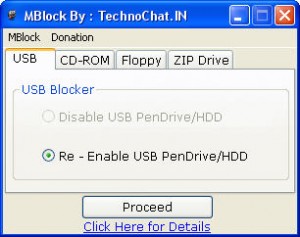
MBlock v1.0 – USB Pendrive Block Option
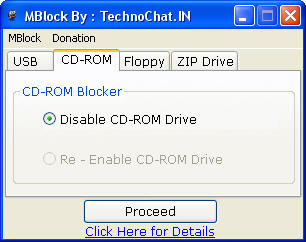
MBlock v1.0 – CDRom Drive Block Option
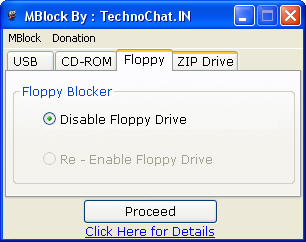
MBlock v1.0 – Floppy Drive Block Option
[ad#av_post]
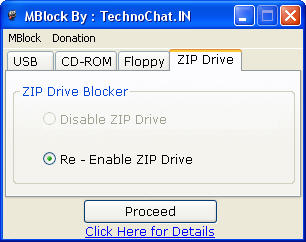
MBlock v1.0 – ZIP Drive Block Option
[ad#av_post]
NOTE : This tools only Block USB Pendrive/HDD Access, not any other USB device like Mouse / Modem, so after using this tools, u still can use other USB Device..

MBlock v1.0 for 64 Bit Windows
 MBlock_v1.0_x64.zip (574.6 KiB, 1,833 hits)
MBlock v1.0 for 32 Bit Windows
MBlock_v1.0_x32.zip (459.3 KiB, 3,503 hits)
Enjoy…
😀
 Licensed under CC BY-ND 4.0 International

The Credential-Free Watchdog: Mastering Event-Driven App Automation
We have all been there. You are an automation lover. You have…
ClearView – Zero Configuration Web Server Monitoring Tool
Have you recently moved away from Linode to any other VPS (Virtual…

Create Private PPTP VPN for personal use in Linode Cloud Hosting.
Nowadays many things are getting blocked by the government, and sometimes without…

Add new Admin Account to AWS Windows Instances to rescue the system
As mentioned earlier, we could reset the local admin password of windows…
I recently came across your blog and have been reading along. I thought I would leave my first comment. I don’t know what to say except that I have enjoyed reading. Nice blog. I will keep visiting this blog very often.
kaylee
hello,
Read your blog, trust me i am impressed. you take a lot of effor in collecting information.
Not good but great job done!
Your blog got my attention on my first visit and now it is in my RSS. Keep up the good work.
Please upload the files. Thanks in advance
Links Updated..
Nice apps. was exactly looking for something like this.
is there a version that you can put a password when opening the apps ?
many thanks
Yea,
it can be possible, but u have to pay small fees for your customized version.
🙂
I like your ver very much IF give me best knowledge about IT related issues and software in the market. greatwork!!!!!!!!!!!!!.
Dear Saugata,
I like your application very much;)
I would like to install it on kiosk systems. Am I allowed to do that regarding the license?
Also I would also like to have the version in which I can define a password.
Also I see the changes do not need rebooting! The kiosk uses an Enhanced Write Filter meaning that the changes are going after a reboot. Is it possible to chane this part of the text?
Walter
If want a personal version for u, i can create one, where u can define password.
And also i can change the text part, but it required some contribution form ur side..
Check https://technochat.in/about/ for my MSN details, add me there, or u can also send me ur requirements on that mail.
also try this
Link Removed!!
Dear all,
suppose if i need to remove this from my computer so what to do???pls..suggest..
[email protected]
What do you want to remove from your computer?
hi, how to uninstall MBlock usb if we want re activate the usb port?? plz suggest me how to do it??
[email protected]
you have to use MBlock again to re-activate.