Contents
- Introduction
- Architecture Overview
- Prerequisites
- Step 1 — Cloudflare Gateway
- Step 2 — Deploy AdGuard Home
- Step 3 — SSL Certificate (Wildcard)
- Step 4 — Strict SNI Enforcement
- Step 5 — Upstream DNS Configuration
- Step 6 — Clients & Access Control
- Step 7 — Filter Lists
- Step 8 — Block Port 53 at Firewall
- Step 9 — Home Router Firewall
- Script A — DoT Client Verification (PowerShell)
- Script B — Certificate Renewal + AdGuard API Update + Portainer Restart
- Script C — Log Monitor Summary
- Script D — Enable Strict SNI via Bash
- Security Audit
- Privacy Analysis
- Security Scorecard
Introduction
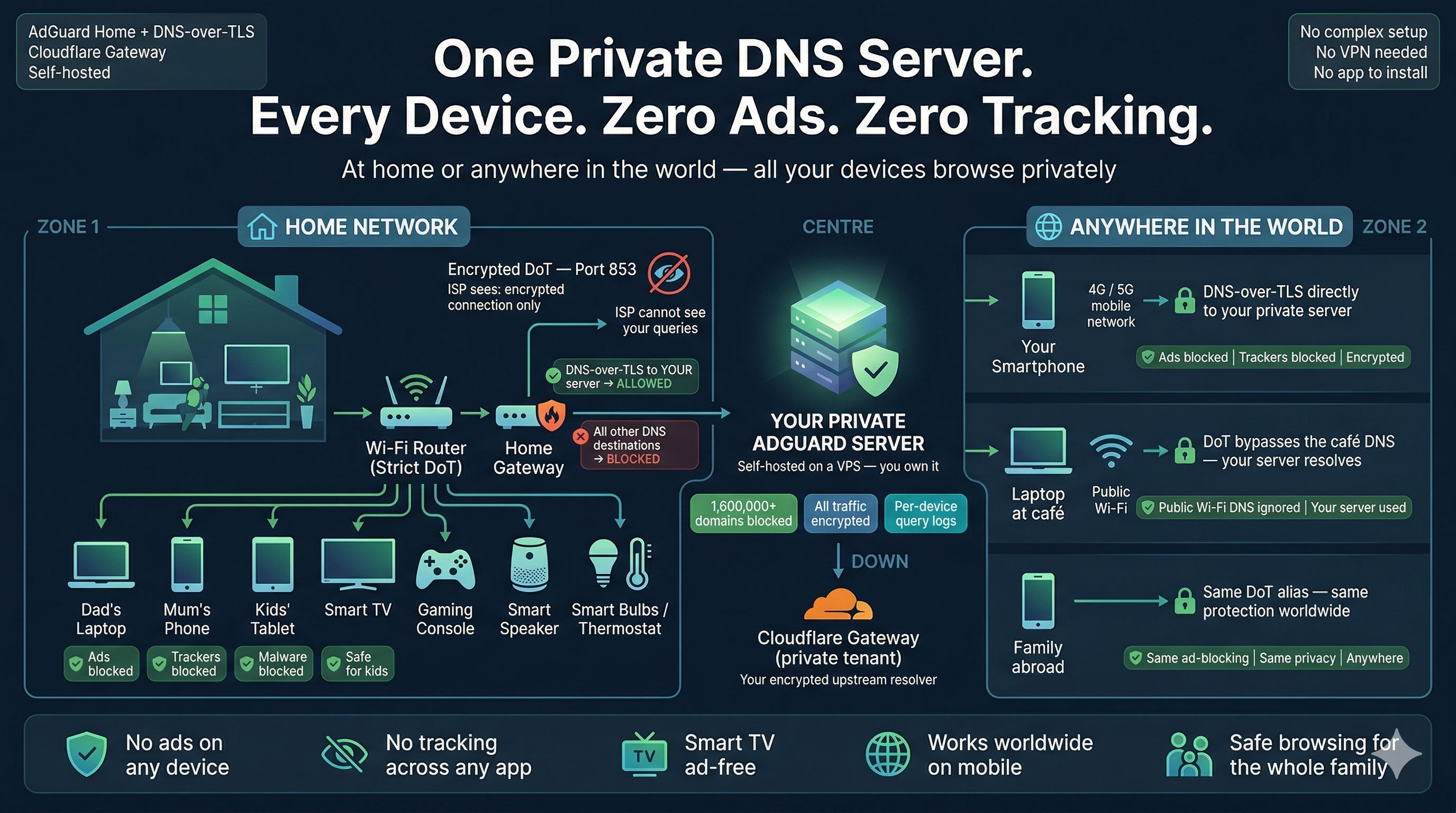
Every DNS query leaving your home network travels in plain text by default. Your ISP sees every domain every device resolves — phones, laptops, smart TVs, IoT devices, gaming consoles — a complete record of your household's internet activity, unencrypted, on port 53.
This guide builds a production-grade private DNS resolver that encrypts all DNS traffic, enforces per-device access control using TLS SNI aliases, applies 1.6 million filter rules across your entire network simultaneously, and makes it impossible for any device to bypass your resolver — including those with hardcoded DNS servers in their firmware.
Beyond the core setup, this guide documents four production scripts covering: PowerShell DoT verification against both nodes, automated certificate renewal that pushes updated certificates directly to the AdGuard API and restarts containers via the Portainer API, log analysis, and SNI enforcement automation.
Architecture Overview
Layer 1 — Cloudflare Gateway
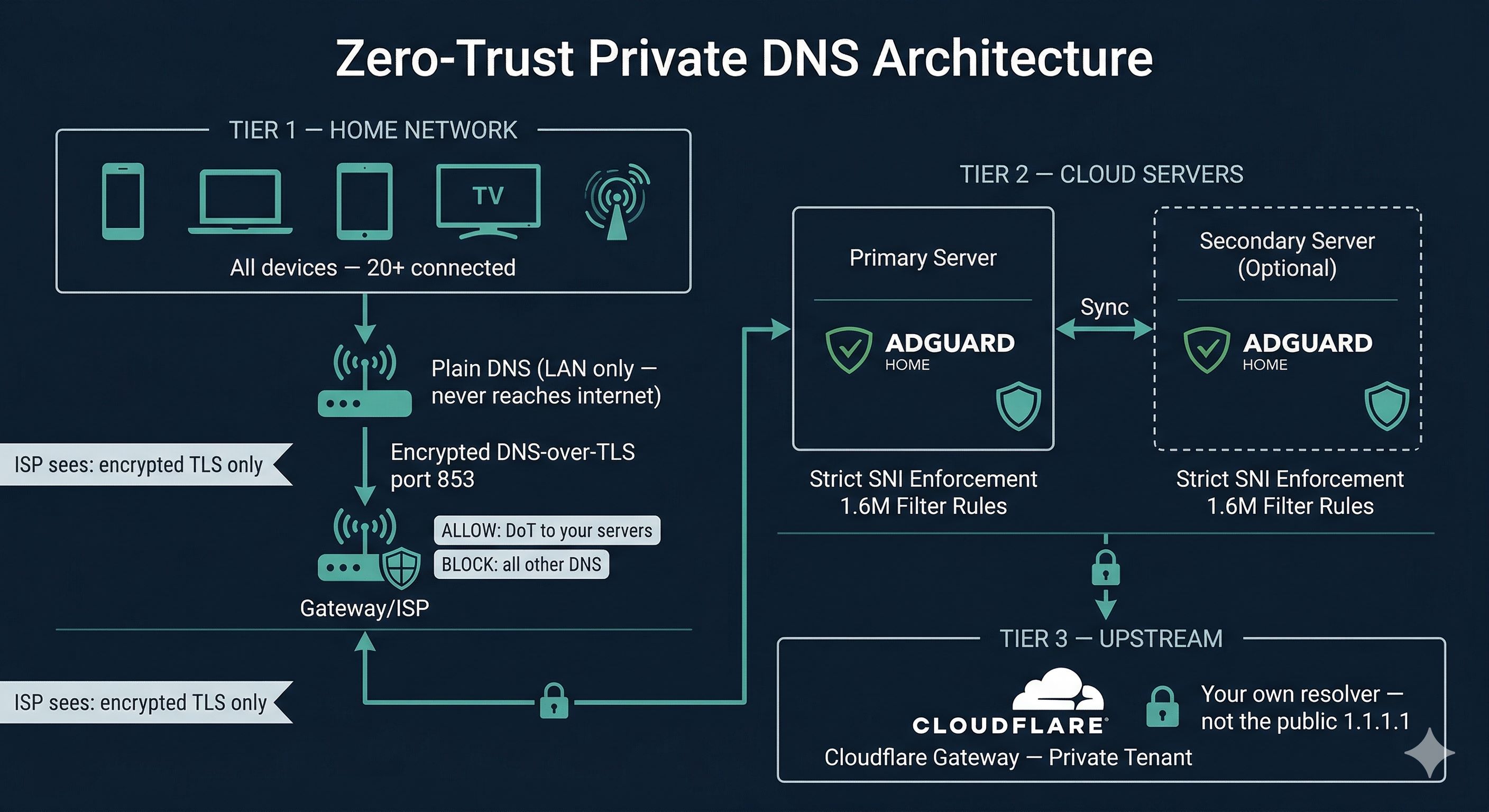
Your private upstream DNS resolver — an isolated tenant in Cloudflare's infrastructure, completely separate from the public 1.1.1.1 service. AdGuard forwards validated queries here over encrypted DoT. Your filtering policies, query logs, and threat intelligence live exclusively in your account.
Layer 2 — AdGuard Home Cluster
One or two AdGuard Home instances running in Docker on cloud VPS servers you control. They accept only DoT connections from registered device aliases, enforce strict SNI checking at the TLS layer before any DNS processing, apply 1.6 million filter rules, and forward legitimate queries to Cloudflare Gateway. A secondary node provides automatic failover — if the primary goes down, your network continues resolving with no manual intervention required.
Layer 3 — Home Network Firewall
Your home router runs in Strict DoT mode. Your gateway router enforces firewall rules that allow DoT traffic only to your server IPs and silently drop all other DNS and DoT traffic. Devices with hardcoded DNS servers have nowhere to go except your resolver.
What the ISP Sees
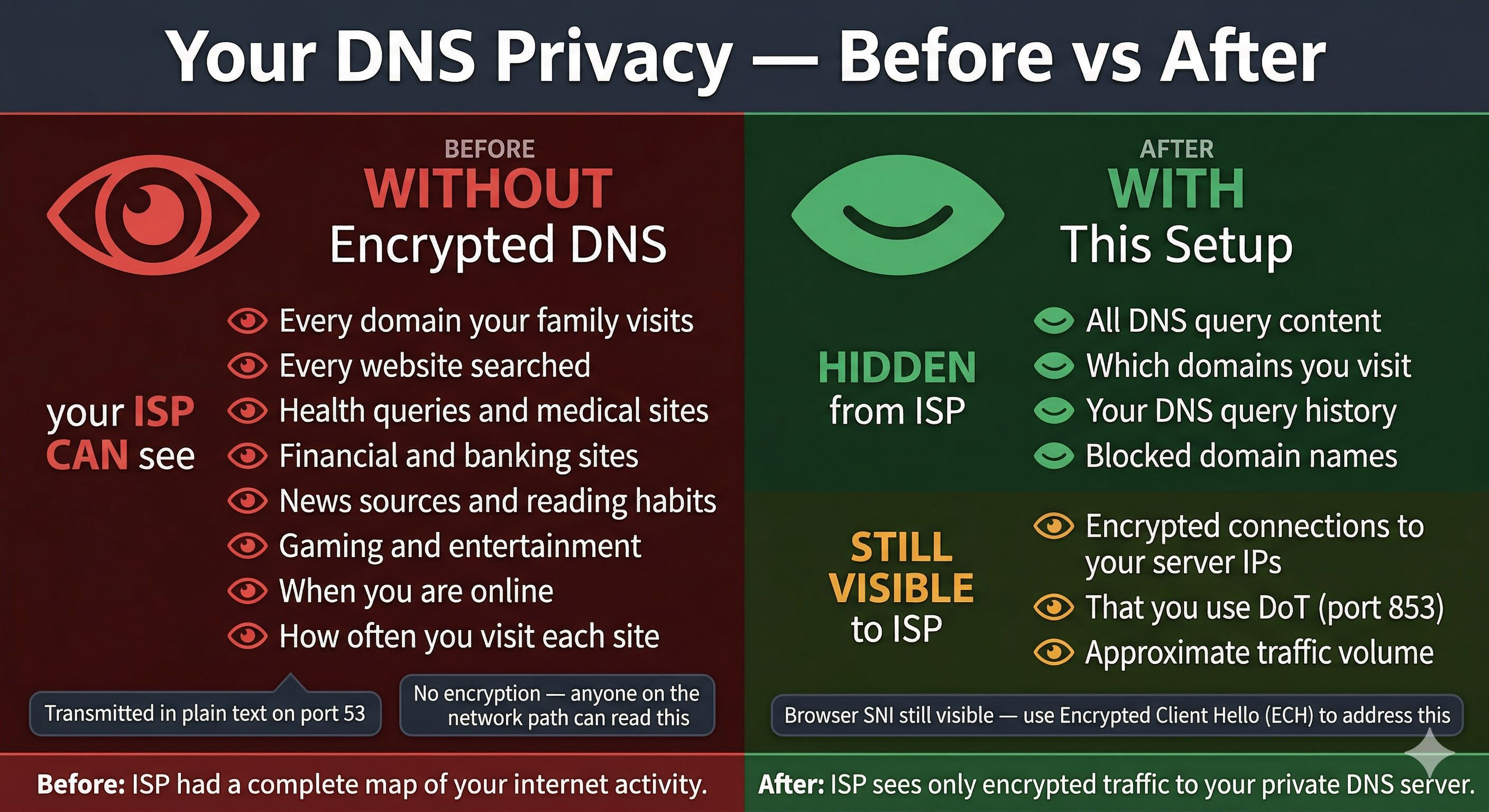
An encrypted TLS connection to your server IP on port 853. No domain names, no query timing, no browsing patterns.
Prerequisites
Confirm all of the following before starting. Having everything ready makes the setup process straightforward.
1. A Domain Name (Required)
You must own a domain name. This guide uses yourdomain.com as a placeholder — replace it throughout. Any registrar works. The domain must be managed by Cloudflare DNS.
- You will use
dns.yourdomain.comas the base for all device aliases - The bare domain
dns.yourdomain.comis intentionally unreachable — only*.dns.yourdomain.comsubdomains serve as DoT endpoints - If running two nodes, use
node1.dns.yourdomain.comandnode2.dns.yourdomain.comas the per-node admin hostnames
2. Cloudflare Account — Free Tier (Required)
- DNS management for your domain (free)
- Cloudflare Zero Trust / Gateway — private DNS resolver, free up to 50 users
- API token for Certbot wildcard certificate issuance
- Optional: Cloudflare Tunnel for secure access to Portainer and AdGuard admin UIs
3. Cloudflare API Token (Required)
- Cloudflare dashboard → My Profile → API Tokens → Create Token
- Template: Edit zone DNS
- Scope: your specific domain only
- Copy and save immediately — shown only once
4. Cloud Servers (At least one required)
Any Linux VPS with a public IP. Minimum: 1 vCPU, 1 GB RAM, Ubuntu 22.04 LTS or Debian 12. Ports 53, 443, and 853 must be openable.
5. Docker and Docker Compose (Required on each server)
curl -fsSL https://get.docker.com | sh
docker --version && docker compose version
6. Portainer (Optional but used by automation scripts)
Portainer provides a web UI for container management and exposes a REST API that the certificate renewal script uses to restart the AdGuard container after a certificate update. Install on each node:
docker volume create portainer_data

docker run -d \
  --name portainer \
  --restart unless-stopped \
  -p 9443:9443 \
  -v /var/run/docker.sock:/var/run/docker.sock \
  -v portainer_data:/data \
  portainer/portainer-ce:latest
After deployment, access at https://your-server-ip:9443, create an admin account, and generate an API key under Account → Access tokens → Add access token. You will need this key for the certificate renewal script.
7. DoT-Capable Home Router (Required for network-wide lockdown)
TP-Link Archer (newer models), ASUS with Merlin firmware, Gl.iNet, any router running OpenWrt, OPNsense, or pfSense.
8. DNS Records in Cloudflare (Create before starting)
# Primary server
dns.yourdomain.com          A      YOUR_PRIMARY_SERVER_IP    Proxy: OFF
*.dns.yourdomain.com        CNAME  dns.yourdomain.com        Proxy: OFF

# Per-node admin access (used by scripts to identify each node)
node1.dns.yourdomain.com    A      YOUR_PRIMARY_SERVER_IP    Proxy: OFF (or via Tunnel)
node2.dns.yourdomain.com    A      YOUR_SECONDARY_SERVER_IP  Proxy: OFF (or via Tunnel)

# Secondary server (optional)
dns2.yourdomain.com         A      YOUR_SECONDARY_SERVER_IP  Proxy: OFF
*.dns2.yourdomain.com       CNAME  dns2.yourdomain.com       Proxy: OFF
Prerequisites Checklist
- Domain registered and nameservers pointed to Cloudflare
- Cloudflare free account with Zero Trust enabled
- Cloudflare API token created with Edit zone DNS permission
- At least one cloud server with Ubuntu/Debian provisioned
- Docker installed on each server
- Portainer installed and API token generated on each server
- DNS A record: dns.yourdomain.com → server IP (Proxy OFF)
- DNS CNAME: *.dns.yourdomain.com → dns.yourdomain.com (Proxy OFF)
- Per-node hostnames: node1.dns.yourdomain.com, node2.dns.yourdomain.com
- DoT-capable home router available
Step-by-Step Implementation
Step 1Set Up Cloudflare Gateway
- Log in to
one.cloudflare.com→ Gateway → DNS Locations → Add a location - Name it (e.g.
Home-Primary) - Note your assigned DoT hostname — format:
<unique-id>.cloudflare-gateway.com - Gateway → Policies → DNS → Create a policy:
- Security: Malware, Phishing, Command and Control — enable all
- Content categories as desired
- Logging: Log all queries
Save your Gateway DoT hostname — you will use it in Step 5 as the upstream for AdGuard.
Step 2Deploy AdGuard Home with Docker
version: "3.8"

services:
  adguardhome:
    image: adguard/adguardhome:latest
    container_name: adguardhome
    restart: unless-stopped
    ports:
      - "53:53/tcp"
      - "53:53/udp"
      - "443:443/tcp"
      - "443:443/udp"
      - "853:853/tcp"
      - "853:853/udp"
      - "80:80/tcp"
    volumes:
      - ./conf:/opt/adguardhome/conf
      - ./work:/opt/adguardhome/work
      - /etc/letsencrypt:/etc/letsencrypt:ro  # cert access
    networks:
      adguard_net:
        ipv4_address: 172.34.0.100

networks:
  adguard_net:
    driver: bridge
    ipam:
      config:
        - subnet: 172.34.0.0/16
docker compose up -d
docker logs adguardhome --tail 20
Access the setup wizard at http://your-server-ip:3000. Set a strong admin password. Repeat identically on your secondary server.
Obtain a Wildcard SSL Certificate
AdGuard Home requires a valid TLS certificate for DoT. You need a wildcard covering *.dns.yourdomain.com — the wildcard only, not the bare domain. The bare domain is intentionally not a valid client endpoint.
apt install certbot python3-certbot-dns-cloudflare -y

mkdir -p ~/.secrets
cat > ~/.secrets/cloudflare.ini << EOF
dns_cloudflare_api_token = YOUR_CLOUDFLARE_API_TOKEN_HERE
EOF
chmod 600 ~/.secrets/cloudflare.ini

# Wildcard only — do NOT add the bare domain
certbot certonly \
  --dns-cloudflare \
  --dns-cloudflare-credentials ~/.secrets/cloudflare.ini \
  -d "*.dns.yourdomain.com"
Certificate files will be at:
/etc/letsencrypt/live/dns.yourdomain.com/fullchain.pem/etc/letsencrypt/live/dns.yourdomain.com/privkey.pem
In AdGuard Home → Settings → Encryption Settings:
- Server name:
dns.yourdomain.com - Certificate path:
/etc/letsencrypt/live/dns.yourdomain.com/fullchain.pem - Private key path:
/etc/letsencrypt/live/dns.yourdomain.com/privkey.pem - Port HTTPS:
443| Port DNS-over-TLS:853
/etc/letsencrypt read-only into the container: The Docker compose above mounts the host's Let's Encrypt directory into the container. This means when the host certificate is renewed, AdGuard can read the updated files on the next restart — no need to copy files manually. The :ro flag ensures the container cannot modify the certificate store.
Enable Strict SNI Enforcement
Method A — Edit AdGuardHome.yaml directly
tls:
  enabled: true
  server_name: dns.yourdomain.com
  strict_sni_check: true
  force_https: true
  port_https: 443
  port_dns_over_tls: 853
  port_dns_over_quic: 0
docker restart adguardhome
Method B — Push via AdGuard TLS API Endpoint
AdGuard Home exposes a REST API endpoint at /control/tls/configure that lets you push a full TLS configuration — including the certificate, private key, and strict_sni_check — without accessing the file system directly. This is how the automated certificate renewal script works.
# Read and base64-encode the certificate and key
CERT_B64=$(base64 -w 0 /etc/letsencrypt/live/dns.yourdomain.com/fullchain.pem)
KEY_B64=$(base64 -w 0 /etc/letsencrypt/live/dns.yourdomain.com/privkey.pem)

# Build the JSON payload
PAYLOAD=$(jq -n \
  --arg sname "dns.yourdomain.com" \
  --arg cert "$CERT_B64" \
  --arg key "$KEY_B64" \
  '{
    "enabled": true,
    "server_name": $sname,
    "force_https": true,
    "port_https": 443,
    "port_dns_over_tls": 853,
    "certificate_chain": $cert,
    "private_key": $key,
    "strict_sni_check": true
  }')

# Send to AdGuard — replace admin:password and hostname
curl -s -u "admin:YOUR_ADGUARD_PASSWORD" \
  -X POST "https://node1.dns.yourdomain.com/control/tls/configure" \
  -H "Content-Type: application/json" \
  -d "$PAYLOAD" \
  -w "\nHTTP Status: %{http_code}\n"
A successful response returns HTTP 200. The configuration is applied immediately — you do not need to restart the container for the TLS settings to take effect, but a restart is recommended to ensure the new certificate is loaded cleanly.
Method C — Restart via Portainer API
Instead of running docker restart on the server directly, the Portainer API lets you trigger a container restart remotely over HTTPS using an API key. This is useful when you need to restart AdGuard on a remote node without SSH access, or as part of an automated script.
# Variables
PORTAINER_URL="https://node1.dns.yourdomain.com:9443"   # or your Portainer URL
PORTAINER_TOKEN="YOUR_PORTAINER_API_TOKEN"
PORTAINER_ENV_ID=1          # Environment ID — check in Portainer UI
CONTAINER_NAME="adguardhome"

# Step 1: Look up the container ID by name
CONTAINER_ID=$(curl -s \
  -H "X-API-Key: $PORTAINER_TOKEN" \
  "$PORTAINER_URL/api/endpoints/$PORTAINER_ENV_ID/docker/containers/json?all=true" \
  | jq -r ".[] | select(.Names[] | contains(\"$CONTAINER_NAME\")) | .Id")

echo "Container ID: ${CONTAINER_ID:0:12}"

# Step 2: Restart the container
HTTP_STATUS=$(curl -s -o /dev/null -w "%{http_code}" \
  -X POST \
  -H "X-API-Key: $PORTAINER_TOKEN" \
  "$PORTAINER_URL/api/endpoints/$PORTAINER_ENV_ID/docker/containers/$CONTAINER_ID/restart")

echo "Restart HTTP status: $HTTP_STATUS"
# 204 = success
/#!/endpoints/2/docker/... — the number after endpoints/ is the environment ID. Use this value for PORTAINER_ENV_ID.
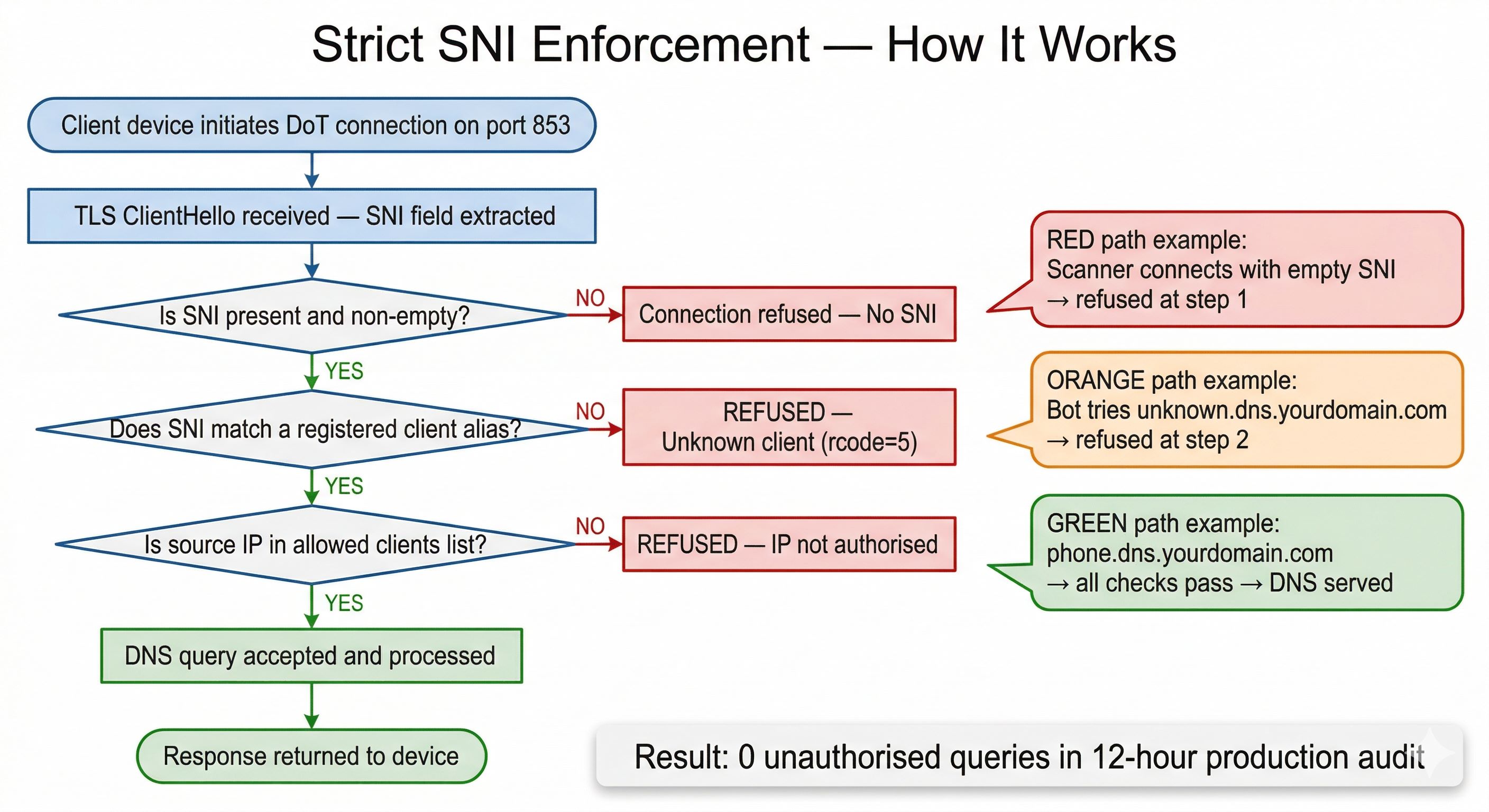
| Incoming SNI | Result | Reason |
|---|---|---|
phone.dns.yourdomain.com | Allowed | Registered client alias |
dns.yourdomain.com (bare) | Refused | Not a valid client alias |
unknown.dns.yourdomain.com | Refused | Not in client list |
anydomain.com | Refused | Wrong server name entirely |
| Empty / missing SNI | Refused | Strict mode requires SNI |
Configure Upstream DNS
dns:
  upstream_dns:
    - tls://your-gateway-id.cloudflare-gateway.com
    - https://your-gateway-id.cloudflare-gateway.com/dns-query
  bootstrap_dns:
    - 172.64.36.1    # Cloudflare anycast infrastructure — not the public 1.1.1.1
    - 172.64.36.2
  fallback_dns:
    - 172.64.36.1
    - 172.64.36.2
  upstream_mode: load_balance
  cache_enabled: true
  cache_size: 4194304
  enable_dnssec: true
  refuse_any: true
  ratelimit: 100
Configure Clients and Access Control
dns:
  allowed_clients:
    - 127.0.0.1
    - 172.16.0.0/11       # All Docker bridge networks (172.16.x.x–172.47.x.x)
    - device1             # Named client aliases matching your client entries
    - device2
    - device3
  disallowed_clients: []
In AdGuard Home → Settings → Client Settings → Add a client. Each client must have a name matching an entry in allowed_clients, and its identifier set to the full SNI alias:
| Client Name | Identifier (SNI Alias) | Notes |
|---|---|---|
| phone | phone.dns.yourdomain.com | Smartphone — stricter rules if desired |
| laptop | laptop.dns.yourdomain.com | Work or personal laptop |
| tv | tv.dns.yourdomain.com | Smart TV — blocks streaming ad domains |
| tablet | tablet.dns.yourdomain.com | Family tablet |
| kids | kids.dns.yourdomain.com | Apply additional content filtering here |
Set Up Filter Lists
AdGuard Home → Filters → DNS Blocklists → Add blocklist. Update interval: 12 hours.
| Filter List | Rules | Purpose |
|---|---|---|
| AdGuard DNS Filter | ~50,000 | Core ads and trackers |
| OISD Big | ~250,000 | Comprehensive blocklist |
| Steven Black Unified | ~160,000 | Ads, malware, fake news |
| HaGeZi Multi Pro | ~330,000 | Aggressive multi-category |
| 1Hosts Pro | ~165,000 | Privacy-focused |
| URLhaus | ~25,000 | Active malware URLs |
| AdAway Default | ~8,000 | Mobile ad networks |
| Total | ~1,600,000+ | Combined protection |
Block Port 53 at Infrastructure Level
Add inbound deny rules at your cloud provider's firewall — independent of AdGuard. Port 53 becomes unreachable from the internet even if AdGuard has a misconfiguration.
- TCP port 53 — source: Any — Action: Deny
- UDP port 53 — source: Any — Action: Deny
- Leave ports 443 and 853 open — required for DoT clients
Configure Home Router Firewall
Wi-Fi Router — Strict DoT Mode
- Mode: DNS-over-TLS Strict (not Opportunistic)
- Primary: your device alias pointing to primary server IP
- Secondary: equivalent alias on secondary server (if applicable)
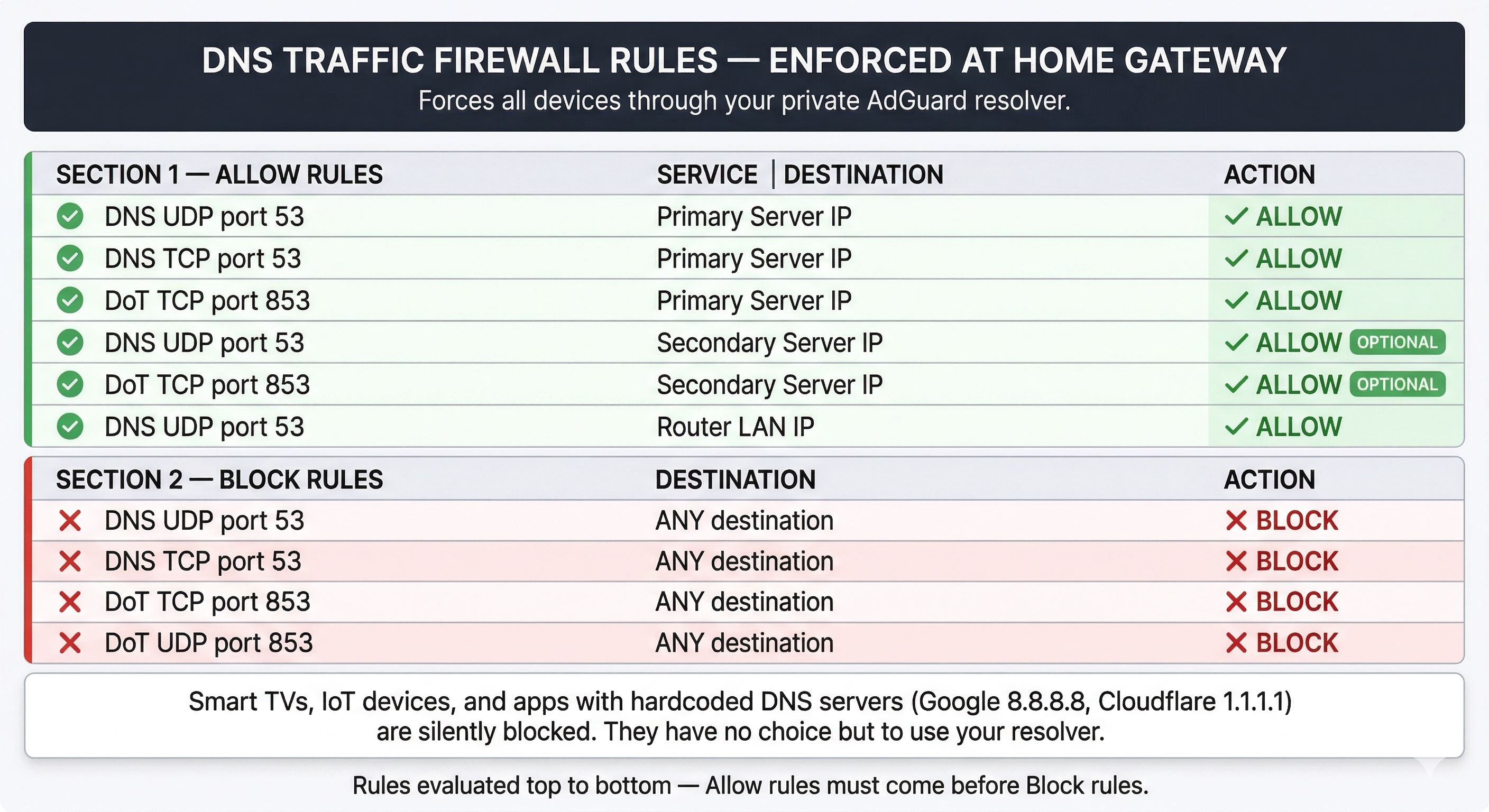
Gateway/ISP Router — Firewall Rules (order matters)
| Service | Destination | Action |
|---|---|---|
| DNS UDP 53 | Primary server IP | ALLOW |
| DNS TCP 53 | Primary server IP | ALLOW |
| DoT TCP 853 | Primary server IP | ALLOW |
| DNS UDP 53 | Secondary server IP (optional) | ALLOW |
| DoT TCP 853 | Secondary server IP (optional) | ALLOW |
| DNS UDP 53 | Router LAN IP | ALLOW |
| DNS UDP 53 | ANY | BLOCK |
| DNS TCP 53 | ANY | BLOCK |
| DoT TCP 853 | ANY | BLOCK |
| DoT UDP 853 | ANY | BLOCK |
Script A — DoT Client Verification (PowerShell)
function Test-AdGuardDoT {
    param(
        [Parameter(Mandatory)][string]$Server,
        [Parameter(Mandatory)][string]$SNI,
        [string]$Query   = "google.com",
        [int]$Port       = 853,
        [int]$Timeout    = 5000
    )

    function Build-DnsQuery {
        param([string]$Domain)
        $labels = $Domain.Split('.')
        $qname  = @()
        foreach ($label in $labels) {
            $bytes  = [System.Text.Encoding]::ASCII.GetBytes($label)
            $qname += [byte]$bytes.Length
            $qname += $bytes
        }
        $qname += [byte]0x00
        $header = [byte[]]@(0xAB,0xCD, 0x01,0x00, 0x00,0x01, 0x00,0x00, 0x00,0x00, 0x00,0x00)
        return $header + $qname + [byte[]]@(0x00,0x01) + [byte[]]@(0x00,0x01)
    }

    $tcp    = $null
    $ssl    = $null
    $result = [PSCustomObject]@{
        Server   = $Server
        Port     = $Port
        SNI      = $SNI
        Query    = $Query
        Status   = "BLOCKED"
        RCODE    = -1
        Answers  = 0
        ErrorMsg = $null
    }

    try {
        $tcp = [System.Net.Sockets.TcpClient]::new($Server, $Port)
        $tcp.ReceiveTimeout = $Timeout
        $tcp.SendTimeout    = $Timeout

        # Accept any certificate — we are testing DoT SNI enforcement,
        # not validating the certificate chain here
        $ssl = [System.Net.Security.SslStream]::new($tcp.GetStream(), $false, { $true })
        $ssl.AuthenticateAsClient($SNI)

        $dnsQuery       = Build-DnsQuery -Domain $Query
        [int]$length    = $dnsQuery.Length
        [byte]$highByte = [math]::Floor($length / 256)
        [byte]$lowByte  = $length % 256
        $fullQuery      = [byte[]]@($highByte, $lowByte) + $dnsQuery

        $ssl.Write($fullQuery, 0, $fullQuery.Length)
        $ssl.Flush()

        $lenBuf = [byte[]]::new(2)
        $ssl.Read($lenBuf, 0, 2) | Out-Null
        [int]$responseLen = $lenBuf[0] * 256 + $lenBuf[1]

        $response = [byte[]]::new($responseLen)
        $ssl.Read($response, 0, $responseLen) | Out-Null

        # Extract RCODE (lower 4 bits of byte 3) and answer count
        [int]$rcode   = $response[3] % 16
        [int]$answers = $response[6] * 256 + $response[7]

        $result.RCODE   = $rcode
        $result.Answers = $answers
        # RCODE 5 = REFUSED — AdGuard's response for unauthorized clients
        $result.Status  = if ($rcode -eq 5) { "BLOCKED" } else { "ALLOWED" }

    } catch {
        $raw             = $_.Exception.Message -replace "`r","" -replace "`n"," " -replace "\s+"," "
        $result.ErrorMsg = if ($raw.Length -gt 30) { $raw.Substring(0,30).TrimEnd() + "..." } else { $raw }
        # TLS failure = blocked at handshake (strict SNI enforcement working)
        $result.Status   = "BLOCKED"
    } finally {
        if ($ssl) { try { $ssl.Close() } catch {} }
        if ($tcp) { try { $tcp.Close() } catch {} }
    }

    return $result
}

function Write-TableRow {
    param(
        [string]$Name, [string]$SNI, [string]$Expected,
        [string]$Got, [string]$Badge, [string]$Detail,
        [string]$BadgeColor, [string]$ExpColor, [string]$GotColor
    )
    Write-Host ("{0,-14} " -f $Name)          -NoNewline -ForegroundColor White
    Write-Host ("{0,-42} " -f $SNI)           -NoNewline -ForegroundColor DarkGray
    Write-Host ("Exp: {0,-7} " -f $Expected)  -NoNewline -ForegroundColor $ExpColor
    Write-Host ("Got: {0,-7} " -f $Got)       -NoNewline -ForegroundColor $GotColor
    Write-Host (" [{0}] "    -f $Badge)       -NoNewline -ForegroundColor $BadgeColor
    Write-Host $Detail                                    -ForegroundColor DarkGray
}

function Invoke-AdGuardTest {
    param(
        [Parameter(Mandatory)][string]$Server,
        [int]$Port     = 853,
        [string]$Query = "google.com",
        [array]$Clients
    )

    $divider = "-" * 100

    Write-Host ""
    Write-Host "  AdGuard Home - DoT Client Access Test" -ForegroundColor Cyan
    Write-Host "  Server  :  $Server : $Port"           -ForegroundColor DarkCyan
    Write-Host "  Query   :  $Query"                    -ForegroundColor DarkCyan
    Write-Host ""
    Write-Host $divider -ForegroundColor DarkGray
    Write-Host ("{0,-14} {1,-42} {2,-12} {3,-12} {4,-8} {5}" -f `
        "  Client", "SNI", "Expected", "Got", "Result", "Detail") -ForegroundColor DarkCyan
    Write-Host $divider -ForegroundColor DarkGray

    $passed = 0; $failed = 0

    foreach ($client in $Clients) {
        $res   = Test-AdGuardDoT -Server $Server -Port $Port -SNI $client.SNI -Query $Query
        $match = $res.Status -eq $client.Expected

        $badge      = if ($match) { "PASS" } else { "FAIL" }
        $badgeColor = if ($match) { "Green" } else { "Red" }
        $expColor   = if ($client.Expected -eq "ALLOWED") { "Green" } else { "Red" }
        $gotColor   = if ($res.Status      -eq "ALLOWED") { "Green" } else { "Red" }
        $detail     = if ($res.ErrorMsg)       { "TLS-ERR: $($res.ErrorMsg)" } `
                      elseif ($res.RCODE -ge 0) { "rcode=$($res.RCODE)  ans=$($res.Answers)" } `
                      else { "" }

        if ($match) { $passed++ } else { $failed++ }

        Write-TableRow -Name $client.Name -SNI $client.SNI `
            -Expected $client.Expected -Got $res.Status `
            -Badge $badge -Detail $detail `
            -BadgeColor $badgeColor -ExpColor $expColor -GotColor $gotColor
    }

    Write-Host $divider -ForegroundColor DarkGray
    Write-Host ""
    Write-Host "  Results :  " -NoNewline -ForegroundColor White
    Write-Host "$passed passed" -NoNewline -ForegroundColor Green
    Write-Host "  |  "         -NoNewline -ForegroundColor DarkGray
    Write-Host "$failed failed" -ForegroundColor $(if ($failed -gt 0) { "Red" } else { "Green" })
    Write-Host ""
}

# ── CONFIGURE YOUR CLIENTS BELOW ─────────────────────────────────────────────
# Add one entry per registered device. Set Expected to ALLOWED or BLOCKED.
# For blocked tests: use the bare domain, an unregistered alias, or a fake domain.

$clients = @(
    [PSCustomObject]@{ Name = "phone";      SNI = "phone.dns.yourdomain.com";   Expected = "ALLOWED" },
    [PSCustomObject]@{ Name = "laptop";     SNI = "laptop.dns.yourdomain.com";  Expected = "ALLOWED" },
    [PSCustomObject]@{ Name = "tv";         SNI = "tv.dns.yourdomain.com";       Expected = "ALLOWED" },
    [PSCustomObject]@{ Name = "tablet";     SNI = "tablet.dns.yourdomain.com";   Expected = "ALLOWED" },
    [PSCustomObject]@{ Name = "kids";       SNI = "kids.dns.yourdomain.com";     Expected = "ALLOWED" },
    [PSCustomObject]@{ Name = "bare domain";SNI = "dns.yourdomain.com";          Expected = "BLOCKED" },
    [PSCustomObject]@{ Name = "unknown";    SNI = "unknown.dns.yourdomain.com";  Expected = "BLOCKED" },
    [PSCustomObject]@{ Name = "fake";       SNI = "fake.com";                    Expected = "BLOCKED" }
)

# ── RUN AGAINST YOUR NODES — replace with your actual server IPs ──────────────
Invoke-AdGuardTest -Server "YOUR_PRIMARY_SERVER_IP"   -Port 853 -Query "google.com" -Clients $clients
Invoke-AdGuardTest -Server "YOUR_SECONDARY_SERVER_IP" -Port 853 -Query "google.com" -Clients $clients
Understanding the output
rcode=0 ans=6— DNS query resolved successfully (ALLOWED client, 6 answers returned)rcode=5 ans=0— REFUSED by AdGuard (client not in allowed list)TLS-ERR— Connection refused at TLS handshake (strict SNI enforcement — SNI not registered)
Script B — Certificate Renewal + AdGuard API Update + Portainer Restart
#!/bin/bash
# ────────────────────────────────────────────────────────────────────────────
# agh-cert-renew.sh
# Checks certificate expiry on each AdGuard node, pushes renewed cert via
# the AdGuard TLS API, and restarts the container via Portainer API.
#
# Usage:
#   sudo ./agh-cert-renew.sh            # Update only if expiry <= DAYS_THRESHOLD
#   sudo ./agh-cert-renew.sh --force    # Force update regardless of expiry
#
# Requirements:  jq, curl, openssl, root privileges
# ────────────────────────────────────────────────────────────────────────────

# ── CONFIGURATION ────────────────────────────────────────────────────────────
SCRIPT_DIR="$(cd "$(dirname "${BASH_SOURCE[0]}")" && pwd)"
ENC_FILE="$SCRIPT_DIR/cred.base64"        # Credential file (see format below)
LOG_FILE="/var/log/agh_ssl_update.log"

# Local certificate path — where certbot stores the renewed certificate
CERT_BASE_DIR="/etc/letsencrypt/live"
DOMAIN_PATTERN="dns.yourdomain.com"       # Must match your certbot domain name
SERVER_NAME="dns.yourdomain.com"          # AdGuard server_name in TLS config

DAYS_THRESHOLD=7                          # Renew if expiry is within this many days

# Portainer endpoints — one per node
# These are the URLs of your Portainer instances, accessible from this server
PORTAINER_NODE1_URL="https://node1.dns.yourdomain.com:9443"
PORTAINER_NODE2_URL="https://node2.dns.yourdomain.com:9443"

# Portainer environment IDs (find in Portainer UI: Environments menu, numeric ID in URL)
PORTAINER_NODE1_ENV=1
PORTAINER_NODE2_ENV=1

CONTAINER_NAME="adguardhome"

# AdGuard node hostnames — used to check live cert expiry and push the update
# These must be reachable over HTTPS from this server
HOSTS=(
    "node1.dns.yourdomain.com"
    "node2.dns.yourdomain.com"
)

# ── SETUP ─────────────────────────────────────────────────────────────────────
# Create log symlink in script directory for convenience
SYMLINK_PATH="$SCRIPT_DIR/agh_ssl_update.log"
if [[ ! -L "$SYMLINK_PATH" ]]; then
    touch "$LOG_FILE"
    ln -s "$LOG_FILE" "$SYMLINK_PATH"
fi

# Parse --force flag
FORCE_UPDATE=0
for arg in "$@"; do
    [[ "$arg" == "--force" || "$arg" == "-f" ]] && FORCE_UPDATE=1
done

# Must run as root (required to read /etc/letsencrypt/live/)
if [[ $EUID -ne 0 ]]; then
    echo "This script must be run as root (use sudo)."
    exit 1
fi

# Check dependency
if ! command -v jq &> /dev/null; then
    echo "ERROR: 'jq' is missing. Install with: apt-get install jq"
    exit 1
fi

log_message() {
    echo "$(date '+%Y-%m-%d %H:%M:%S') - $1" | tee -a "$LOG_FILE"
}

# ── CREDENTIAL FILE FORMAT ────────────────────────────────────────────────────
# File: cred.base64 (in same directory as this script)
# Each Portainer token is stored base64-encoded for basic obfuscation.
# To encode a token:  printf "your-token-here" | base64
#
# File contents:
#   NODE1_TOKEN=
#   NODE2_TOKEN=
#   AGH_CREDS=admin:your-adguard-password
#
# AGH_CREDS is used for HTTP Basic Auth against the AdGuard API.
# ─────────────────────────────────────────────────────────────────────────────

if [[ ! -f "$ENC_FILE" ]]; then
    log_message "ERROR: Credential file $ENC_FILE not found."
    exit 1
fi

# Source the credential file and decode tokens
source "$ENC_FILE"
NODE1_TOKEN=$(printf "%s" "$NODE1_TOKEN" | base64 -d 2>/dev/null)
NODE2_TOKEN=$(printf "%s" "$NODE2_TOKEN" | base64 -d 2>/dev/null)

if [[ -z "$AGH_CREDS" || -z "$NODE1_TOKEN" || -z "$NODE2_TOKEN" ]]; then
    log_message "ERROR: Missing credentials. Required: AGH_CREDS, NODE1_TOKEN, NODE2_TOKEN"
    exit 1
fi

# ── PORTAINER RESTART FUNCTION ────────────────────────────────────────────────
# Looks up the AdGuard container ID by name and triggers a restart via
# the Portainer Docker proxy API.
portainer_restart() {
    local host="$1"
    local portainer_url portainer_token portainer_env

    # Select credentials based on which host we are restarting
    if [[ "$host" == "node1.dns.yourdomain.com" ]]; then
        portainer_url="$PORTAINER_NODE1_URL"
        portainer_token="$NODE1_TOKEN"
        portainer_env="$PORTAINER_NODE1_ENV"
    else
        portainer_url="$PORTAINER_NODE2_URL"
        portainer_token="$NODE2_TOKEN"
        portainer_env="$PORTAINER_NODE2_ENV"
    fi

    log_message "ACTION: Looking up container '$CONTAINER_NAME' on $portainer_url..."

    # Query Portainer's Docker proxy for a list of all containers,
    # then extract the ID of the one matching CONTAINER_NAME
    CONTAINER_ID=$(curl -s \
        -H "X-API-Key: $portainer_token" \
        "$portainer_url/api/endpoints/$portainer_env/docker/containers/json?all=true" \
        | jq -r ".[] | select(.Names[] | contains(\"$CONTAINER_NAME\")) | .Id")

    if [[ -z "$CONTAINER_ID" ]]; then
        log_message "ERROR: Container '$CONTAINER_NAME' not found on $portainer_url."
        return 1
    fi

    log_message "INFO: Container ID ${CONTAINER_ID:0:12} found."

    # Trigger a restart — Portainer proxies this to the Docker daemon
    # HTTP 204 = success (no content)
    HTTP_STATUS=$(curl -s -o /dev/null -w "%{http_code}" \
        -X POST \
        -H "X-API-Key: $portainer_token" \
        "$portainer_url/api/endpoints/$portainer_env/docker/containers/$CONTAINER_ID/restart")

    if [[ "$HTTP_STATUS" == "204" ]]; then
        log_message "SUCCESS: '$CONTAINER_NAME' restarted via Portainer on $host (HTTP 204)."
    else
        log_message "FAILURE: Portainer restart failed on $host (HTTP $HTTP_STATUS)."
        return 1
    fi
}

# ── FIND LATEST LOCAL CERTIFICATE ─────────────────────────────────────────────
LATEST_DIR=$(ls -d "${CERT_BASE_DIR}/${DOMAIN_PATTERN}"* 2>/dev/null | sort -V | tail -n 1)
if [[ -z "$LATEST_DIR" ]]; then
    log_message "ERROR: No certificate directory found matching '${DOMAIN_PATTERN}' in $CERT_BASE_DIR."
    exit 1
fi

CERT_FILE="$LATEST_DIR/fullchain.pem"
KEY_FILE="$LATEST_DIR/privkey.pem"
log_message "INFO: Using certificate from $LATEST_DIR"

# ── MAIN LOOP: CHECK AND UPDATE EACH NODE ─────────────────────────────────────
for HOST in "${HOSTS[@]}"; do
    log_message "--- Checking $HOST ---"

    # Connect to port 443 and read the live certificate's expiry date
    REMOTE_EXPIRY_DATE=$(echo | openssl s_client \
        -servername "$HOST" -connect "$HOST":443 2>/dev/null \
        | openssl x509 -noout -enddate 2>/dev/null | cut -d= -f2)

    if [[ -z "$REMOTE_EXPIRY_DATE" ]]; then
        log_message "ERROR: Could not reach $HOST:443 to check certificate expiry."
        continue
    fi

    EXPIRY_EPOCH=$(date -d "$REMOTE_EXPIRY_DATE" +%s)
    NOW_EPOCH=$(date +%s)
    DIFF_DAYS=$(( (EXPIRY_EPOCH - NOW_EPOCH) / 86400 ))

    log_message "INFO: $HOST certificate expires in $DIFF_DAYS days ($REMOTE_EXPIRY_DATE)."

    # Update if within threshold OR if --force was passed
    if [[ "$DIFF_DAYS" -le "$DAYS_THRESHOLD" ]] || [[ "$FORCE_UPDATE" -eq 1 ]]; then

        if [[ "$FORCE_UPDATE" -eq 1 ]]; then
            log_message "ACTION: --force flag set. Pushing certificate to $HOST regardless of expiry."
        else
            log_message "ACTION: $DIFF_DAYS days until expiry — within threshold. Updating $HOST..."
        fi

        # Base64-encode certificate and key for the API payload
        CERT_B64=$(base64 -w 0 "$CERT_FILE")
        KEY_B64=$(base64 -w 0 "$KEY_FILE")

        # Build JSON payload for AdGuard TLS API
        # strict_sni_check: true — always enforce, even after cert update
        PAYLOAD=$(jq -n \
            --arg sname "$SERVER_NAME" \
            --arg cert "$CERT_B64" \
            --arg key "$KEY_B64" \
            '{
                "enabled": true,
                "server_name": $sname,
                "force_https": true,
                "port_https": 443,
                "port_dns_over_tls": 853,
                "certificate_chain": $cert,
                "private_key": $key,
                "strict_sni_check": true
            }')

        # Push to AdGuard TLS configuration API
        RESP_FILE=$(mktemp)
        HTTP_STATUS=$(curl -s -u "$AGH_CREDS" \
            -X POST "https://$HOST/control/tls/configure" \
            -H "Content-Type: application/json" \
            -d "$PAYLOAD" \
            -w "%{http_code}" -o "$RESP_FILE")
        RESPONSE_BODY=$(cat "$RESP_FILE")
        rm -f "$RESP_FILE"

        if [[ "$HTTP_STATUS" == "200" ]]; then
            log_message "SUCCESS: Certificate pushed to $HOST via AdGuard API (HTTP 200)."
            # Restart the container so the new certificate is loaded cleanly
            portainer_restart "$HOST"
        else
            log_message "FAILURE: AdGuard API update failed on $HOST (HTTP $HTTP_STATUS)."
            log_message "DETAIL: $RESPONSE_BODY"
        fi

    else
        log_message "INFO: $HOST is healthy ($DIFF_DAYS days remaining). No action needed."
    fi

done

log_message "--- Run complete ---"
Setting up the credential file
# Encode each Portainer token — run this on your server for each token
printf "your-node1-portainer-api-token" | base64
# Output: eW91ci1ub2RlMS1wb3J0YWluZXItYXBpLXRva2Vu

printf "your-node2-portainer-api-token" | base64
# Output: eW91ci1ub2RlMi1wb3J0YWluZXItYXBpLXRva2Vu

# Then create the credential file
cat > /opt/adguard/cred.base64 << 'EOF'
NODE1_TOKEN=eW91ci1ub2RlMS1wb3J0YWluZXItYXBpLXRva2Vu
NODE2_TOKEN=eW91ci1ub2RlMi1wb3J0YWluZXItYXBpLXRva2Vu
AGH_CREDS=admin:your-adguard-admin-password
EOF

chmod 600 /opt/adguard/cred.base64
Install and schedule
mkdir -p /opt/adguard
cp agh-cert-renew.sh /opt/adguard/
chmod +x /opt/adguard/agh-cert-renew.sh

# Test manually first
sudo /opt/adguard/agh-cert-renew.sh --force

# If successful, add to root crontab
crontab -e
# Add this line — runs at 3am daily:
0 3 * * * /opt/adguard/agh-cert-renew.sh >> /var/log/agh_ssl_update.log 2>&1
How the script handles each node — step by step
-
Check live certificate expiry (OpenSSL): connects to
node.dns.yourdomain.com:443and reads the actual certificate expiry from the live server — not from the local file. This catches the case where a node has an outdated certificate even if the local Let's Encrypt file has already been renewed.How expiry is checked (inside the script)REMOTE_EXPIRY_DATE=$(echo | openssl s_client \ -servername "$HOST" -connect "$HOST":443 2>/dev/null \ | openssl x509 -noout -enddate | cut -d= -f2) DIFF_DAYS=$(( (EXPIRY_EPOCH - NOW_EPOCH) / 86400 )) -
Push certificate via AdGuard TLS API: reads the local
fullchain.pemandprivkey.pem, base64-encodes both, and POSTs a JSON payload to/control/tls/configure. The payload includes the certificate chain, private key, server name, port settings, and criticallystrict_sni_check: true— this ensures SNI enforcement is always re-applied after a certificate update, even if it was accidentally disabled. HTTP 200 = success.AdGuard TLS API payload structurePOST https://node1.dns.yourdomain.com/control/tls/configure Authorization: Basic admin:password Content-Type: application/json { "enabled": true, "server_name": "dns.yourdomain.com", "force_https": true, "port_https": 443, "port_dns_over_tls": 853, "certificate_chain": "<base64-encoded fullchain.pem>", "private_key": "<base64-encoded privkey.pem>", "strict_sni_check": true ← always enforced on every update } Response: HTTP 200 OK -
Restart container via Portainer API (two sub-steps):
Sub-step 3a — Look up container ID: the script cannot hardcode a container ID because Docker generates a new one on each container recreation. Instead, it queries the Portainer Docker proxy API for a list of all containers and filters by name. This works even if the container was recreated since the script was last run.Sub-step 3b — Restart the container: sends a POST to the Portainer Docker proxy restart endpoint using the container ID from sub-step 3a. Portainer proxies this to the Docker daemon. HTTP 204 = success (no content, which is Docker's standard success response for a restart).Portainer API — look up container ID by nameGET https://node1.dns.yourdomain.com:9443/api/endpoints/1/docker/containers/json?all=true X-API-Key: your-portainer-api-token # Response is a JSON array of all containers. # The script filters for the one whose name contains "adguardhome": CONTAINER_ID=$(... | jq -r ".[] | select(.Names[] | contains(\"adguardhome\")) | .Id")
After restart, AdGuard loads the updated certificate from the mountedPortainer API — restart containerPOST https://node1.dns.yourdomain.com:9443/api/endpoints/1/docker/containers/<CONTAINER_ID>/restart X-API-Key: your-portainer-api-token Response: HTTP 204 No Content ← success Response: HTTP 404 ← container not found Response: HTTP 500 ← Docker daemon error
/etc/letsencryptvolume and applies all settings fromAdGuardHome.yamlincludingstrict_sni_check: true. -
Logging: every action — check result, API response, Portainer restart status — is timestamped and appended to
/var/log/agh_ssl_update.log. A symlink is created in the script directory for convenience. Usetail -f /var/log/agh_ssl_update.logto monitor a live run.
Script C — Log Monitor Summary (Bash)
#!/bin/bash
# ────────────────────────────────────────────────────────────────────────────
# adguard-log-summary.sh
# Parses AdGuard Home container logs and prints a health summary.
# Usage:
#   ./adguard-log-summary.sh        # Last 24 hours
#   ./adguard-log-summary.sh 6      # Last 6 hours
# ────────────────────────────────────────────────────────────────────────────

CONTAINER="adguardhome"
HOURS=${1:-24}

LOGS=$(docker logs "${CONTAINER}" --since "${HOURS}h" 2>&1)

echo "========================================================"
echo " AdGuard Home — Log Summary (last ${HOURS} hours)"
echo "========================================================"
echo ""
echo "Event Counts:"
echo "  Invalid SNI rejections   : $(echo "$LOGS" | grep -c 'invalid SNI')"
echo "  TLS handshake errors     : $(echo "$LOGS" | grep -c 'TLS handshake error')"
echo "  Filter list updates      : $(echo "$LOGS" | grep -c 'filter updated')"
echo "  Admin logins             : $(echo "$LOGS" | grep -c 'successful login')"
echo "  Upstream timeouts        : $(echo "$LOGS" | grep -c 'i/o timeout')"
echo "  Service restarts         : $(echo "$LOGS" | grep -c 'starting adguard home')"
echo "  Upstream conn errors     : $(echo "$LOGS" | grep -c 'response received upstream')"
echo ""
echo "Top Source IPs (TLS errors):"
echo "$LOGS" | grep 'TLS handshake error from' | \
    grep -oP '\d+\.\d+\.\d+\.\d+' | \
    sort | uniq -c | sort -rn | head -10 | \
    awk '{printf "  %-8s hits  :  %s\n", $1, $2}'
echo ""
echo "Recent Invalid SNI values:"
echo "$LOGS" | grep 'unknown SNI in Client Hello' | \
    grep -oP 'server_name=\K[^\s"]+' | \
    sort | uniq -c | sort -rn | head -10 | \
    awk '{printf "  %-6s times  :  %s\n", $1, $2}'
echo ""
echo "Container Status:"
docker inspect --format='  Status   : {{.State.Status}}' "${CONTAINER}" 2>/dev/null
docker inspect --format='  Started  : {{.State.StartedAt}}' "${CONTAINER}" 2>/dev/null
echo "========================================================"
Script D — Enable Strict SNI via Bash
#!/bin/bash
# ────────────────────────────────────────────────────────────────────────────
# enable-strict-sni.sh
# Enables strict SNI enforcement in AdGuardHome.yaml and restarts the container.
# Run from the directory containing your docker-compose.yml.
# ────────────────────────────────────────────────────────────────────────────

CONTAINER="adguardhome"
CONFIG_PATH="./conf/AdGuardHome.yaml"
TIMESTAMP=$(date '+%Y-%m-%d %H:%M:%S')

echo "[$TIMESTAMP] Enabling strict SNI check on $CONTAINER..."

# Verify config exists
if [[ ! -f "$CONFIG_PATH" ]]; then
    echo "ERROR: Config file not found at $CONFIG_PATH"
    echo "       Run this script from the directory containing your docker-compose.yml"
    exit 1
fi

# Back up current config
BACKUP="${CONFIG_PATH}.backup.$(date +%s)"
cp "$CONFIG_PATH" "$BACKUP"
echo "Config backed up to $BACKUP"

# Apply the setting
if grep -q "strict_sni_check" "$CONFIG_PATH"; then
    # Key exists — update it (handles both true and false)
    sed -i 's/strict_sni_check: false/strict_sni_check: true/' "$CONFIG_PATH"
    echo "Updated strict_sni_check to true."
else
    # Key not present — add it after 'enabled: true' in the tls section
    sed -i '/^tls:/,/^[^[:space:]]/{s/\(  enabled: true\)/\1\n  strict_sni_check: true/}' "$CONFIG_PATH"
    echo "Added strict_sni_check: true to tls section."
fi

# Verify the change took effect
if grep -q "strict_sni_check: true" "$CONFIG_PATH"; then
    echo "Verification: strict_sni_check: true confirmed in $CONFIG_PATH"
else
    echo "WARNING: Could not verify the change. Check $CONFIG_PATH manually."
    exit 1
fi

# Restart the container
echo "Restarting $CONTAINER..."
docker restart "$CONTAINER"

if [[ $? -eq 0 ]]; then
    echo ""
    echo "Done. Strict SNI enforcement is now active."
    echo "Run the PowerShell verification script (Script A) to confirm client access."
else
    echo "ERROR: Container failed to restart. Check 'docker logs $CONTAINER'."
    exit 1
fi
Security Audit — What Attacks Look Like
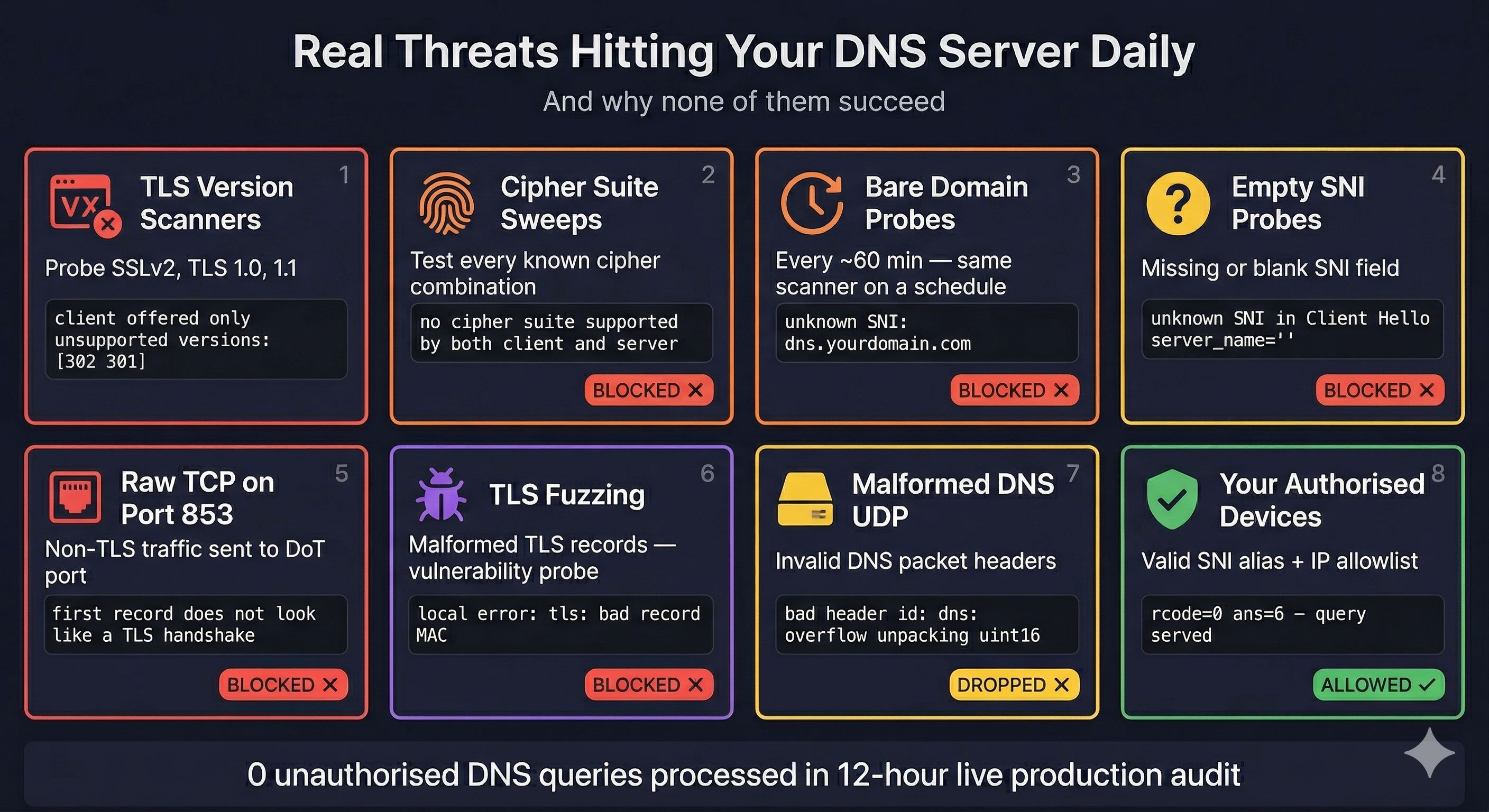
Once your server has a public IP, internet scanners find it within minutes. The following table records the attack types observed in a 12-hour live production audit and how the architecture handled each.
| Attack Type | Log Message | Outcome |
|---|---|---|
| TLS version scanners | tls: client offered only unsupported versions: [302 301] | Blocked at TLS handshake |
| Cipher suite sweeps | tls: no cipher suite supported by both client and server | Blocked at TLS handshake |
| Bare domain DoT probes | unknown SNI in Client Hello server_name=dns.yourdomain.com | Blocked by strict_sni_check |
| Empty SNI probes | unknown SNI in Client Hello server_name="" | Blocked by strict_sni_check |
| Raw TCP on port 853 | first record does not look like a TLS handshake | Blocked — not valid TLS |
| TLS fuzzing / bad MACs | local error: tls: bad record MAC | Blocked by Go TLS layer |
| Malformed DNS UDP | bad header id: dns: overflow unpacking uint16 | Dropped by AdGuard |
| SSLv2 probes | tls: unsupported SSLv2 handshake received | Blocked — obsolete protocol |
Privacy Analysis
| Data | ISP Visibility | Notes |
|---|---|---|
| DNS query content | None | Encrypted inside DoT TLS tunnel |
| Which domains you visit | None | Not visible from encrypted traffic |
| DNS query history | None | Fully encrypted — no accessible record |
| That you use DoT | Yes | Port 853 connections are visible |
| Your server IP addresses | Yes | IPs are not encrypted |
| Website SNI (browser TLS) | Yes | Separate from DNS — use ECH to address |
| Approximate traffic volume | Yes | Packet counts and timing visible |
Browser SNI — The Remaining Gap
When your browser connects to a website, the hostname is sent in the TLS ClientHello as Server Name Indication. This is visible to your ISP independently of DNS. Encrypted Client Hello (ECH) addresses this:
- Firefox: enable
network.dns.echconfig.enabledinabout:config - Chrome 117+: ECH is supported automatically
- The destination site must support ECH — Cloudflare-hosted sites do
Security Assessment Scorecard
| Security Layer | Score | Status |
|---|---|---|
| DoT SNI enforcement | 10/10 | Zero unauthorised queries in production audit |
| Certificate design | 10/10 | Bare domain unreachable — scanners get cert error |
| Port 53 infrastructure block | 10/10 | Blocked at cloud firewall — independent of AdGuard |
| Per-device identification | 10/10 | Unique SNI alias per device — no software on device |
| Encrypted upstream | 10/10 | Private Cloudflare Gateway — not public resolver |
| Home router lockdown | 10/10 | IoT and hardcoded DNS bypass fully blocked |
| Certificate renewal automation | 10/10 | API-push + Portainer restart — fully automated |
| Filter lists | 9/10 | 1.6M+ rules, 7 lists, updated daily |
| Container isolation | 9/10 | Dedicated Docker network per service |
| Port 853/443 exposure | 8/10 | Required for DoT clients — intentional, not a gap |
Zero-Trust Private DNS Architecture — Complete Implementation Guide
Written by Saugata Datta · DevOps Manager · Cloud Infrastructure Specialist
technochat.in · 2026