As mentioned earlier, we could reset the local admin password of windows instances via registry, but unfortunately that will not going to help us if we forget the user id details or we renamed the user id. And the good news is, we still will be able to logon into the system by creating one new Admin Account using AWS User Data. This process is very simple as described bellow.
- You have to re-attached the root volume of faulty system to a working AWS instances.
- Now, you have to use EC2Rescue to enable user data (Ec2HandelUserData), which will execute a script on next boot. (*This could be done by editing config.xml file of EC2Config)

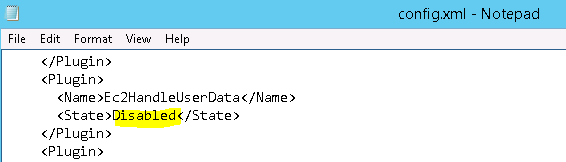
- Once done, you have to re-attach the volume to the original system as root (/dev/sda1) volume.
- Now, from AWS EC2 Console, you have to select the server and edit the User Data before starting the server and add the following PowerShell script. This script will create a Admin Account called “MyAdminX” with the password “!!4SJKAHGYWMd4!!” on first boot and you will be able to logon to the server using this new account.
|
1 2 3 4 5 6 7 8 9 10 11 12 13 14 15 16 |
<powershell> $Name="MyAdminX" $Computer = [ADSI]"WinNT://$Env:COMPUTERNAME,Computer" $LocalAdmin = $Computer.Create("User", $Name) $LocalAdmin.SetPassword("!!4SJKAHGYWMd4!!") $LocalAdmin.SetInfo() $LocalAdmin.FullName = $Name $LocalAdmin.SetInfo() $LocalAdmin.Description = "Admin Account created using User Data" $LocalAdmin.SetInfo() $LocalAdmin.UserFlags = 64 + 65536 # ADS_UF_PASSWD_CANT_CHANGE + ADS_UF_DONT_EXPIRE_PASSWD $LocalAdmin.SetInfo() $AdminGroup = [ADSI]"WinNT://$Env:COMPUTERNAME/Administrators,group" $User = [ADSI]"WinNT://$Env:COMPUTERNAME/$Name,User" $AdminGroup.Add($User.Path) </powershell> |
I hope this will be helpful for you.
 Licensed under CC BY-ND 4.0 International
You Might Also Like

Windows Users Beware: SnappyClient — The Compact Implant That Hijacks Crypto and Disables Defenses
A compact but capable Windows implant called SnappyClient has emerged as a…

Stryker Confirms Massive Wiper Strike — Thousands of Devices Erased in Alleged Iran-Linked Operation
Stryker, the global medical technology company, confirmed on March 11, 2026, that…

Microsoft Plans to Disable Hands‑Free Automated Installation for Windows 11 and Server 2025 After Critical RCE Flaw
Microsoft has announced a hardening plan for Windows Deployment Services (WDS) after…
Hotpatch Alert: Microsoft Fixes Critical RRAS Remote-Execution Flaws in Windows 11
Microsoft issued an out-of-band hotpatch on March 13, 2026, to address a…
So useful in such a hurry, simple and elegant; THANKS