
I personally can’t imagine supporting a big infrastructure without introducing automation and to automate something you have to use command line. If you are more into Windows and started working on AWS for your clients, then I assume that you would love to start managing AWS using AWS PowerShell Module like I do. AWS Console is really good and informative
Category: Automation
Zapier, Make, n8n, Power Automate, UiPath, Automation Anywhere, Blue Prism, Workato, Tray.io, Boomi, MuleSoft, Celigo, Pabbly Connect, Integrately, Kissflow, ServiceNow, Puppet, Ansible, Terraform, Selenium, Cypress, Playwright, Appium, Postman, JMeter, Katalon, Tricentis, IBM RPA, Pega, Kofax, Appian, ActiveBatch, IFTTT, Apple Shortcuts, HubSpot Workflows, Jira Automation
Multi-Threading Super-Fast Disk Utilization Report using Background Jobs in PowerShell

Automate task using script is always helpful, it reduced human error and efforts, but sometimes it still takes a lots of time to execute same command on multiple remote servers one by one. For example, my disk utilization script, it works perfectly fine, but taking lots of time to generate report for thousands of servers. To get the result faster
New Mahindra KUV100 – Most Affordable SUV for Young Indians

Mahindra KUV100 just launched in India today at a starting price of 4.42 lakh (ex-showroom) which goes all the way up to 6.76 lakh (ex-showroom). One of the most highly-anticipated cars in India, the latest Mahindra sub-compact SUV is the home-grown automaker’s third sub-4 metre vehicle here.
AWS EBS Snapshots Automation (Disaster Recovery) from Windows PowerShell

It is always a good idea to reduce hardware dependencies by moving your data to the cloud. Cloud is much more flexible than traditional hardware infrastructure including VMWare. But you still have to consider the ability of recovering data as and when required. This always helps you to keep your business running with minimal interruption. In AWS, there are several
How to configure Home Folder with extra security
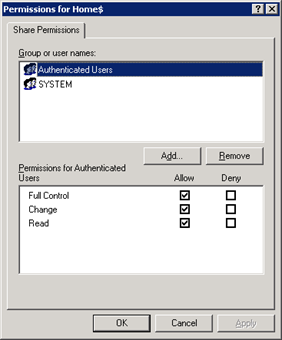
If you are having a domain controller, and decided to give a personal drive for all users, then home folder configuration is the best way to do it. But if you want to make it secure for every users, then you have to configure something extra with ntfs security and share security. Our current requirement as follows: Deploy home folder
Shared TempDrive Cleanup Script – Automated
Sometimes it’s not possible to remember a specific weekly job to perform. So if we can make it as scheduled job to do the same, it will be better. There will be not such risk. Just take my example, I have to clean our office common shared temporary folder on every Sunday, but I am not in office on Sunday.