It is very common that sometimes we disabled the network adapter from VM to trouble shoot some network related issue, and after doing so we suddenly realize that we made a big mistake, especially if we do it on Azure VMs. Suddenly we lost all the communication to the VM, no RDP, no PowerShell, and VM got completely isolated from the network. If AWS, we could fix this very easily by adding one additional network adapter (ENI), but in Azure, it will be little bit tricky, coz currently Azure VM does NOT support adding or removing NICs after a VM is created, Multi-NIC can only be applied when a VM is created. So, fixing this will be bit trickier for Azure VMs. If you search “Disabled network card on Azure VM“, you will get multiple solution, but unfortunately those are not working with newer Azure VM (Resource Manager).
To fix this issue, you have to follow the steps bellow, and you will be able to re-enable the adapter.
- Select VM from http://portal.azure.com
- Select Network interfaces
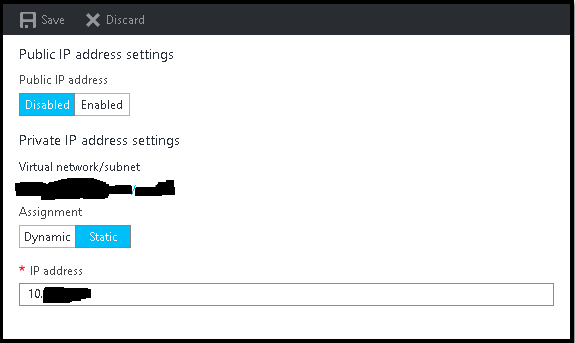
- Select IP configurations
- Change the Static IP to Dynamic and Save the settings
- Wait till configuration gets updated.
- Now again change it from Dynamic to Static and also change the IP Address to a new one for the same VNET and Save.
- This will reboot the instance and after some time you will get the ping response from the new IP.
- Now you have to follow the exact same steps to change the IP back to old one.
- And finally you will able to get the VM with old IP.
- If you wish, buy me a cup of coffee.
 Licensed under CC BY-ND 4.0 International

Microsoft removes Support and Recovery Assistant from Windows — what it means
Microsoft has removed the Support and Recovery Assistant (SaRA) from Windows, according…

Anthropic opens Microsoft 365 connectors to all Claude plans — what it means for users
Anthropic has quietly broadened access to one of Claude’s most practical integrations:…
Microsoft Forces Upgrades on Unmanaged Windows 11 24H2 PCs Amid Rapid Emergency Fixes
Microsoft has begun rolling out forced upgrades for unmanaged Windows 11 devices…
Microsoft issues emergency Windows 11 update KB5086672 to fix broken March preview (KB5079391)
Microsoft has released an out-of-band (OOB) emergency update—KB5086672—to address installation problems introduced…
These steps are really helpful in mentioned scenario.
Thankx
Thanks. Worked perfectly. Takes a while after the IP configuration gets saved (and completed) to kick in and the connections start working.
You are welcome.
Mann saved my ass
🙂
Saved my bacon. Many thanks 🙂
You Welcome! 🙂
Great, thank you so much. I had tried about 10 other options found on the web, only yours worked, thanks again!
You Welcome! 🙂
Changing IP address, Will it impact applications running inside the VM?
It is totally depending on how you configured the application and coded it. If the old IP address is hard-coded anywhere, then the application will not work, else it will be fine.
Regards,
Saugata D.
If you are doing it to recover the VM connectivity, then no need to worry, you will be reverting back to the old IP after following all the steps.
You can see here(include step by step)
http://helen-trinh.blogspot.com/2017/12/how-to-enable-net-card-virtual-machine.html
You are really awesome, this one worked for me.
You welcome 🙂
Thank you Very much for your support it worked for me !!!
You welcome 🙂