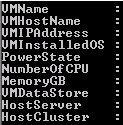
Sometimes it’s a painful job to extract all the information from vCenter server. From GUI you could export information, but not all the information will be available. I was requested to extrach following information. VM Name Host Name VM IP Address Installed Guest OS Power State of VM Allotted number of CPU Allotted total memory Connected Data store Host Server
Category: Cloud-Computing
EC2, S3, Lambda, RDS, DynamoDB, VPC, CloudFront, Route 53, IAM, CloudWatch, EKS, VMs, Blob Storage, Azure Functions, Azure SQL, Cosmos DB, VNet, Azure AD, Azure Monitor, AKS, Compute Engine, Cloud Storage, Cloud Functions, Cloud SQL, BigQuery, GKE, Pub/Sub, Cloud Run, App Engine.
AWS EBS Snapshots Automation (Disaster Recovery) from Windows PowerShell

It is always a good idea to reduce hardware dependencies by moving your data to the cloud. Cloud is much more flexible than traditional hardware infrastructure including VMWare. But you still have to consider the ability of recovering data as and when required. This always helps you to keep your business running with minimal interruption. In AWS, there are several
Nokia Lumia 800 Review – Amazing Everyday

I was N8 user for last 1 year, and till now technically its the best phone out there on the market. I was happy with my N8. Amazing Day 1: After announcement of Lumia 800 from Nokia, I decided to take my chance with new Lumia 800, so I pre-ordered my Lumia with 3000/- from Nokia Store, and I was