Sometimes it’s a painful job to extract all the information from vCenter server. From GUI you could export information, but not all the information will be available. I was requested to extrach following information.
- VM Name
- Host Name
- VM IP Address
- Installed Guest OS
- Power State of VM
- Allotted number of CPU
- Allotted total memory
- Connected Data store
- Host Server
- Host Cluster
There is no way we could extract all the above information from vCenter GUI, so I have created a PowerShell script using PowerCLI which will extract all the required information in following order.
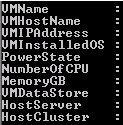
Use this following PowerShell script to export all the information in one go.
|
1 2 3 4 5 6 7 8 9 10 11 12 13 14 15 16 17 18 19 20 21 22 23 24 25 26 27 28 29 30 31 32 33 34 |
$ExportPath = "Output CSV file FullPath" $VmInfo = Get-VM $VMS = ($VmInfo).Name $VCenter = @() foreach ($VM in $VMS) { $HostServer = (($VmInfo | ? {$_.Name -eq $VM}).Host).Name $VMSysInfo = Get-VMGuest -VM $VM $MyObject = New-Object PSObject -Property @{ VMName = $VM VMHostName = $VMSysInfo.HostName VMIP = $VMSysInfo.IPAddress VMInstalledOS = $VMSysInfo.OSFullName PowerState = ($VmInfo | ? {$_.Name -eq $VM}).PowerState NumberOfCPU = ($VmInfo | ? {$_.Name -eq $VM}).NumCpu MemoryGB = (($VmInfo | ? {$_.Name -eq $VM}).MemoryMB/1024) VMDataS = (Get-Datastore -VM $VM).Name HostServer = (($VmInfo | ? {$_.Name -eq $VM}).Host).Name HostCluster = (Get-Cluster -VMHost $HostServer).Name } $VCenter += $MyObject } $VCenter | Select VMName, VMHostName, @{N='VMIPAddress';E={$_.VMIP -join '; '}}, VMInstalledOS, PowerState, NumberOfCPU, MemoryGB, @{N='VMDataStore';E={$_.VMDataS -join '; '}}, HostServer, HostCluster | Export-Csv $ExportPath -NoTypeInformation |
Update : Fixed VM Installed OS.
 Licensed under CC BY-ND 4.0 International
Introducing the Azure Skills Plugin: Practical Azure Workflows for Coding Agents
The Azure Skills Plugin brings curated Azure expertise and an execution layer…
Enhanced Storage Resiliency with Azure NetApp Files Elastic Zone‑Redundant Service
Data resiliency is a baseline requirement for modern enterprise applications. Short interruptions…

When Local Trust Breaks: The OpenClaw 0-Click Vulnerability and What Developers Must Do Now
The speed at which developer-facing AI agents have been adopted is staggering…
Urgent Patching Required: Multiple VMware Aria Vulnerabilities Enable Remote Code Execution and Privilege Escalation
VMware’s Aria Operations — a cornerstone for many organizations’ cloud and infrastructure…