A very simple script for automate user profile backup and restore. Easy to use, and highly customizable, so you can modify it as per your needs.
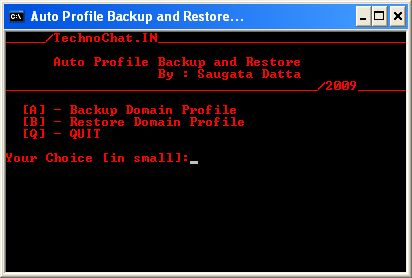
Code:
|
1 2 3 4 5 6 7 8 9 10 11 12 13 14 15 16 17 18 19 20 21 22 23 24 25 26 27 28 29 30 31 32 33 34 35 36 37 38 39 40 41 42 43 44 45 46 47 48 49 50 51 52 53 54 55 56 57 58 59 60 61 62 63 64 65 66 67 68 69 70 71 72 73 74 75 76 77 78 79 80 81 82 83 84 85 86 87 88 89 90 91 92 93 94 95 96 97 98 99 100 101 102 103 104 105 106 107 108 109 |
@echo off color 0c REM PBR_AUTO.BAT REM Created by Saugata Datta REM Version 0.01 REM Auto Profile Backup and Restore MODE CON: COLS=50 LINES=20 setlocal %~d0 cd "%~dp0" :_tsk title Auto Profile Backup and Restore... set _task= cls echo _____/TechnoChat.IN_______________________________ echo Auto Profile Backup and Restore echo By : Saugata Datta echo _______________________________________/2009______ echo [A] - Backup Domain Profile echo [B] - Restore Domain Profile echo [Q] - QUIT echo. set /p _task=Your Choice [in small]: echo. if "%_task%" == "a" goto _bkp if "%_task%" == "b" goto _res if "%_task%" == "q" goto _quit if not "%_task%" == "a or b or q" goto _tsk :_bkp cd set /p _uname=Type user account Name: %SystemDrive% cd "Documents and Settings" if not exist %_uname% (echo Wrong user name.. goto _bkp) :_drv set /p _drive=Type Drive letter[like D]: if not exist %_drive%:RECYCLER (echo Wrong drive... goto _drv) if exist "%_drive%:%_uname%_apbr" ( echo Deleting old Backup rmdir /s /q "%_drive%:%_uname%_apbr") mkdir "%_drive%:%_uname%_apbr" mkdir "%_drive%:%_uname%_apbrFavorites" mkdir "%_drive%:%_uname%_apbrDesktop" mkdir "%_drive%:%_uname%_apbrMy Documents" mkdir "%_drive%:%_uname%_apbrRecent" mkdir "%_drive%:%_uname%_apbrApplication Data" mkdir "%_drive%:%_uname%_apbrApplication DataMicrosoft" mkdir "%_drive%:%_uname%_apbrApplication DataMicrosoftOffice" mkdir "%_drive%:%_uname%_apbrApplication DataMicrosoftOutlook" mkdir "%_drive%:%_uname%_apbrLocal SettingsHistory" echo %cd% xcopy /e /h /r /y "%_uname%Favorites" "%_drive%:%_uname%_apbrFavorites" xcopy /e /h /r /y "%_uname%Desktop" "%_drive%:%_uname%_apbrDesktop" xcopy /e /h /r /y "%_uname%My Documents" "%_drive%:%_uname%_apbrMy Documents" xcopy /e /h /r /y "%_uname%Application DataMicrosoftOffice" "%_drive%:%_uname%_apbrApplication DataMicrosoftOffice" xcopy /e /h /r /y "%_uname%Application DataMicrosoftOutlook" "%_drive%:%_uname%_apbrApplication DataMicrosoftOutlook" xcopy /e /h /r /y "%_uname%Local SettingsHistory" "%_drive%:%_uname%_apbrLocal SettingsHistory" goto _bsucc :_res cd set /p _uname=Type user account Name: %SystemDrive% cd "Documents and Settings" if not exist %_uname% (echo Wrong user name.. goto _res) :_drv2 set /p _rdes=Type backup drive: if not exist %_rdes%:RECYCLER (echo Wrong drive... goto _drv2) if not exist %_rdes%:%_uname%_apbr (echo Old backup not available... cd goto _res) xcopy /e /h /r /y "%_rdes%:%_uname%_apbrFavorites" "%_uname%Favorites" xcopy /e /h /r /y "%_rdes%:%_uname%_apbrDesktop" "%_uname%Desktop" xcopy /e /h /r /y "%_rdes%:%_uname%_apbrMy Documents" "%_uname%My Documents" xcopy /e /h /r /y "%_rdes%:%_uname%_apbrApplication DataMicrosoftOffice" "%_uname%Application DataMicrosoftOffice" xcopy /e /h /r /y "%_rdes%:%_uname%_apbrApplication DataMicrosoftOutlook" "%_uname%Application DataMicrosoftOutlook" xcopy /e /h /r /y "%_rdes%:%_uname%_apbrLocal SettingsHistory" "%_uname%Local SettingsHistory" goto _rsucc :_rsucc @echo off MODE CON: COLS=34 LINES=4 echo. echo *** Restore Successful *** echo. pause >nul goto _quit :_bsucc @echo off MODE CON: COLS=34 LINES=10 echo. echo. echo *** Backup Successful *** echo. echo Backup taken to following folder echo. echo %_drive%:%_uname%_apbr pause >nul goto _quit :_quit endlocal exit |
 Licensed under CC BY-ND 4.0 International
You Might Also Like

What’s New in Microsoft Defender: AI Triage, Predictive Hardening, and Call Monitoring — What IT Teams Should Know
Microsoft used RSA 2026 to roll out a wave of Defender enhancements…

Claude Cowork finally lands on Windows
Anthropic’s Claude Cowork has arrived on Windows, closing a major platform gap…
How to Automate GPO Tasks in Active Directory: PowerShell Techniques with Practical Examples
Automating Group Policy Object (GPO) tasks in Active Directory is critical for…

Face-Off: Windows PowerShell vs PowerShell Core — The Real-World Transition
PowerShell has come a long way since its inception, becoming an essential…
Nice script. Thank you.
Where do I put the script in order to be executed automatically before a user get logged in?
This script not for logon purpose, this is build for taking windows profile backup before renaming/deleting the user profile.
That’s the thing i am looking for. If i want to copy the data to network share, what changes I have to made. Pleas…………….e advise
you can use UNC path for that or, you can map network path before using it over network share.
I am getting a error saying wrong drive letter even though I am entering the correct drive letter.