Author

Saugata Datta

I’m an IT/DevOps professional with many years of hands-on experience across Windows, Linux, Automation, Backup and Cloud. I love building real-world automations to make infrastructure reliable, secure, and self-healing. Through this blog, I share practical learnings from enterprise projects and my home-lab experiments on Cloudflare, Self-Hosting and everything in between. Always tinkering, always improving.
Page 31
New Feature : EC2 Instance Console Screenshot for Boot Troubleshooting

New Feature : EC2 Instance Console Screenshot for Boot Troubleshooting

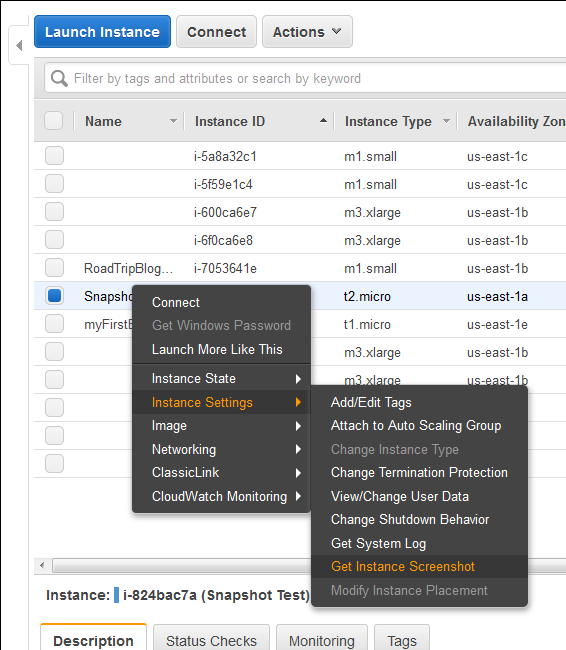
Finally a great feature add to AWS EC2 instances (HVM virtualization only), which was requested by almost everyone. Now we can take a console screenshot of any EC2 Instances. This is now available publicly. Earlier we had to log a case with AWS Support to get the AWS Console screenshot. This is a similar feature like Boot Diagnostics for Azure Virtual Machines v2. This new feature will be very much…

Saugata Datta1 min read7.9K
Multi-Threading Super-Fast Disk Utilization Report using Background Jobs in PowerShell

Multi-Threading Super-Fast Disk Utilization Report using Background Jobs in PowerShell

Automate task using script is always helpful, it reduced human error and efforts, but sometimes it still takes a lots of time to execute same command on multiple remote servers one by one. For example, my disk utilization script, it works perfectly fine, but taking lots of time to generate report for thousands of servers. To get the result faster I started looking for using Background Jobs, and the result…

Saugata Datta3 min read7.9K
Task Scheduler Error “A specified logon session does not exist” – Fix via Command Line and PowerShell for Scripting

Task Scheduler Error “A specified logon session does not exist” – Fix via Command Line and PowerShell for Scripting

This is very know issue, if you search internet, you will get multiple blog post with same solution for this issue, and if you follow the steps, it actually resolve this issue. In simple word, solution of this problem is Logon to the faulty system. Open SECPOL.MSC from Run Go to Security Settings | Local Policies | Security Options Open Network access: Do not allow storage of passwords and credentials…

Saugata Datta3 min read7.7K
Playing with String in PowerShell

Playing with String in PowerShell

As being a Windows Administrator I use PowerShell every day and the best part of it is, I learn something new every day. In simple word PowerShell can make your life easier, and I think you all agreed with it. I often requested to pull various reports from various sources and it was not always possible to get the exact report by executing one or more cmdlet. Sometimes had to manipulate…

Saugata Datta3 min read7.1K
How to Quit Smoking

How to Quit Smoking

Quit smoking is really tougher than we thought, but not Impossible. And If I can do it, I am pretty much sure that you can also do it. Today, I am going to share my experience with you on how I quit smoking. We always need some short of motivation to perform any task. This motivation could be anything, but if there was nothing to motivate, it is highly possible…

Saugata Datta3 min read8K
New Mahindra KUV100 – Most Affordable SUV for Young Indians

New Mahindra KUV100 – Most Affordable SUV for Young Indians

Mahindra KUV100 just launched in India today at a starting price of 4.42 lakh (ex-showroom) which goes all the way up to 6.76 lakh (ex-showroom). One of the most highly-anticipated cars in India, the latest Mahindra sub-compact SUV is the home-grown automaker's third sub-4 metre vehicle here. KUV100 will be available in four variants - K2, K4, K6 and K8. Mahindra KUV100's design is inspired by its elder sibling, Mahindra…

Saugata Datta4 min read6.8K
Setup your own Monitoring – Disk Space Utilization Monitoring tool for free

Setup your own Monitoring – Disk Space Utilization Monitoring tool for free

It is always recommended to keep tracking of the disk space utilization for you servers. This will help us to get the idea of our future requirement. There are multiple tools available for track this but you have to pay for most of them. Recently I also had similar kind of requirement and I was asked to provide the free solution for this. There are some free tools available but…

Saugata Datta3 min read8.5K
Migrating a VMWARE VM to AWS using AWS PowerShell

Migrating a VMWARE VM to AWS using AWS PowerShell

In this topic we will describes the necessary steps to migrate a VMWare VM to the Amazon Web Services (AWS) using PowerShell. You could also migrate VM using AWS command line tools, but I found using PowerShell is much easier than command line tools. Requirements: AWS Tools for Windows PowerShell http://aws.amazon.com/powershell/ IAM account to authenticate. Basic knowledge on PowerShell. Preparing VMware Guest: There are few things need to be fix…

Saugata Datta3 min read11.4K
How to reset windows password (offline) on AWS Windows Instance

How to reset windows password (offline) on AWS Windows Instance

In simple word changing/resetting windows password is a very simple task using any third party free or paid tools as long as you able to access server console. Even on virtual platform like Hyper-V VMWare you have access to server console, but when it comes to AWS, there is no way to access console of a virtual instances. So, those tools will not work, as those required user input /…

Saugata Datta3 min read10.2K
Port Scanner using PowerShell with Email Notification

Port Scanner using PowerShell with Email Notification

Few days back I was asked to create a script, which will check RDP port status of multiple servers and send the result as an email notification. I have searched for few, but unfortunately there was no ready script for that. I decided to build one using PowerShell, and came out with following script. Hope this script might help you as well. #Which port to scan $port = 3389 #Path…

Saugata Datta1 min read11.3K
Extract VM details from VCenter

Extract VM details from VCenter

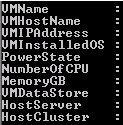
Sometimes it's a painful job to extract all the information from vCenter server. From GUI you could export information, but not all the information will be available. I was requested to extrach following information. VM Name Host Name VM IP Address Installed Guest OS Power State of VM Allotted number of CPU Allotted total memory Connected Data store Host Server Host Cluster There is no way we could extract all…

Saugata Datta2 min read15.5K
🧰

Free Tools: IP, DNS, SSL

40+ free network and other tools in one place. No signup. Click explore or visit https://technochat.in/tools

Explore