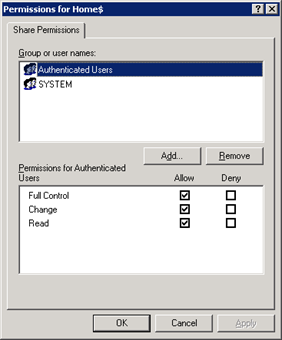
If you are having a domain controller, and decided to give a personal drive for all users, then home folder configuration is the best way to do it. But if you want to make it secure for every users, then you have to configure something extra with ntfs security and share security. Our current requirement as follows: Deploy home folder
Category: Microsoft
Windows, Windows Server, Microsoft 365, Word, Excel, PowerPoint, Outlook, OneNote, Teams, SharePoint, OneDrive, Edge, Bing, SQL Server, Visual Studio, Active Directory, Dynamics 365, Power BI, Power Apps, Xbox, Game Pass, Surface, Intune, Defender, Exchange, Hyper-V, .NET, Dataverse, Microsoft Copilot, Copilot Studio, Microsoft Fabric, Power Platform, Windows 11, Windows 10, WSL, Windows Subsystem for Linux
Domain Tools v1.0 – For Delegating Users ID related Calls
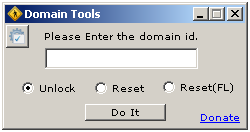
As being a Windows Administrator, I found that almost every day we spend ¼ of our working time for resetting password and unlocking user ids. I decided to delegate this job to someone else (Yes, I know that it can be done via OU Delegation, but in some complex environment, it’s not a good idea), hence I start coding a
Using JAF on Windows 7 – Tutorial
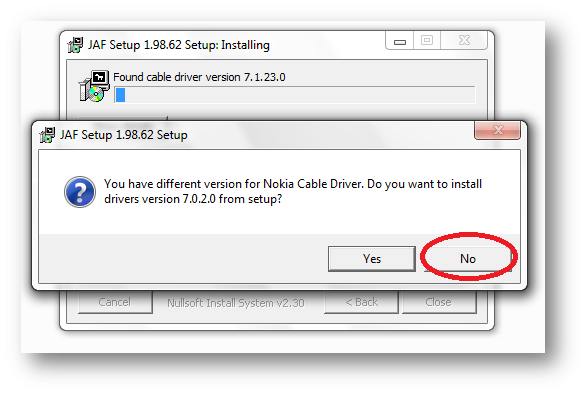
Following things you need… Nokia PC Suite 7.1. **Don’t use OVI Suite. http://nds1.nokia.com/files/support/global/phones/software/Nokia_PC_Suite_eng_web.exe JAF v1.98.6 PKEY Emulator v5 Following steps you have to follow… Install Nokia PC Suite 7.1 & Connect your Phone to finish installing all drivers and restart your system Install JAF v1.98.62 after restart (But don’t install Nokia Cable Driver comes with JAF Installer).
Sync TIME in Solaris 10 Server with Local Windows(Active Directory) NTP Server

There are certain steps to configure NTP on Solaris, and it’s really easy and simple. Just follow the following steps For Starting NTP on Solaris: Logon to the server using root. Now go to /etc/inet/ Rename ntp.client to ntp.conf Now edit ntp.conf and replace multicastclient 224.0.1.1 with server ip-of-your-winntp-server dos # ident “@(#)ntp.client 1.3 00/07/17 SMI” # # /etc/inet/ntp.client #
RealVNC MSI Deployment

For giving instant remote support to almost 1500+ desktop, we have to use some remote control tool, so we decided to install RealVNC server only to all the system. But manually it will take huge time to install RealVNC server to all the system. So, I started working on convert it into MSI package, which we can easily deploy via
Reset Password of a Remote RealVNC Server (Admin Tool)
In my office, our helpdesk engineers provide support to almost 1500 desktop, and all are in different locations, so we use free RealVNC server for remote support. Sometimes, our engineer’s faces lots to issue regarding VNC server password, sometimes user might change the VNC password, or sometimes we change the password for some security reason. And to resolve this issue