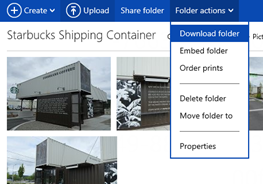
Microsoft has announced a massive update to SkyDrive, bringing the user interface of the Windows 8 app to the website. The new SkyDrive features the new, modern design for desktop and tablet browsers with instant search, contextual toolbar, thumbnail multi-select, drag-and-drop organization, and HTML5 sorting. Pictures are now finally sorted from newest to oldest and users can specify the sort
Category: Microsoft
Windows, Windows Server, Microsoft 365, Word, Excel, PowerPoint, Outlook, OneNote, Teams, SharePoint, OneDrive, Edge, Bing, SQL Server, Visual Studio, Active Directory, Dynamics 365, Power BI, Power Apps, Xbox, Game Pass, Surface, Intune, Defender, Exchange, Hyper-V, .NET, Dataverse, Microsoft Copilot, Copilot Studio, Microsoft Fabric, Power Platform, Windows 11, Windows 10, WSL, Windows Subsystem for Linux
Nokia Lumia 800 Review – Amazing Everyday

I was N8 user for last 1 year, and till now technically its the best phone out there on the market. I was happy with my N8. Amazing Day 1: After announcement of Lumia 800 from Nokia, I decided to take my chance with new Lumia 800, so I pre-ordered my Lumia with 3000/- from Nokia Store, and I was
WINDOWS 2008 R2 FAILOVER CLUSTER on VMWARE
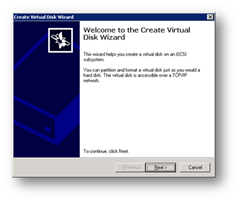
For windows 2003 cluster, check my old tutorial on following link. https://technochat.in/2008/11/configure-cluster-on-vmware-using-iscsi/ Windows 2008 R2 Cluster Requirements: 1. Two Systems with Same Hardware Configuration. 2. Two Network Card 3. Windows 2008 R2 Enterprise Edition on both systems with same patch level. 4. Active Directory 5. Shared Storage( SAN or iSCSI) 6. Both servers should be the member of same domain.
Domain Tools v1.2 Final – For Delegating Users ID related Calls – Update
Previous Version: https://technochat.in/2010/08/domain-tools-v1-0-for-delegating-users-id-related-calls/ Main Window Configuration Window
How to configure Home Folder with extra security
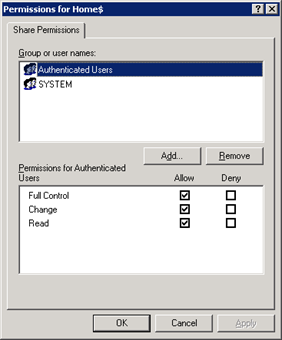
If you are having a domain controller, and decided to give a personal drive for all users, then home folder configuration is the best way to do it. But if you want to make it secure for every users, then you have to configure something extra with ntfs security and share security. Our current requirement as follows: Deploy home folder
Domain Tools v1.0 – For Delegating Users ID related Calls
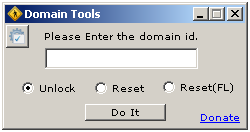
As being a Windows Administrator, I found that almost every day we spend ¼ of our working time for resetting password and unlocking user ids. I decided to delegate this job to someone else (Yes, I know that it can be done via OU Delegation, but in some complex environment, it’s not a good idea), hence I start coding a