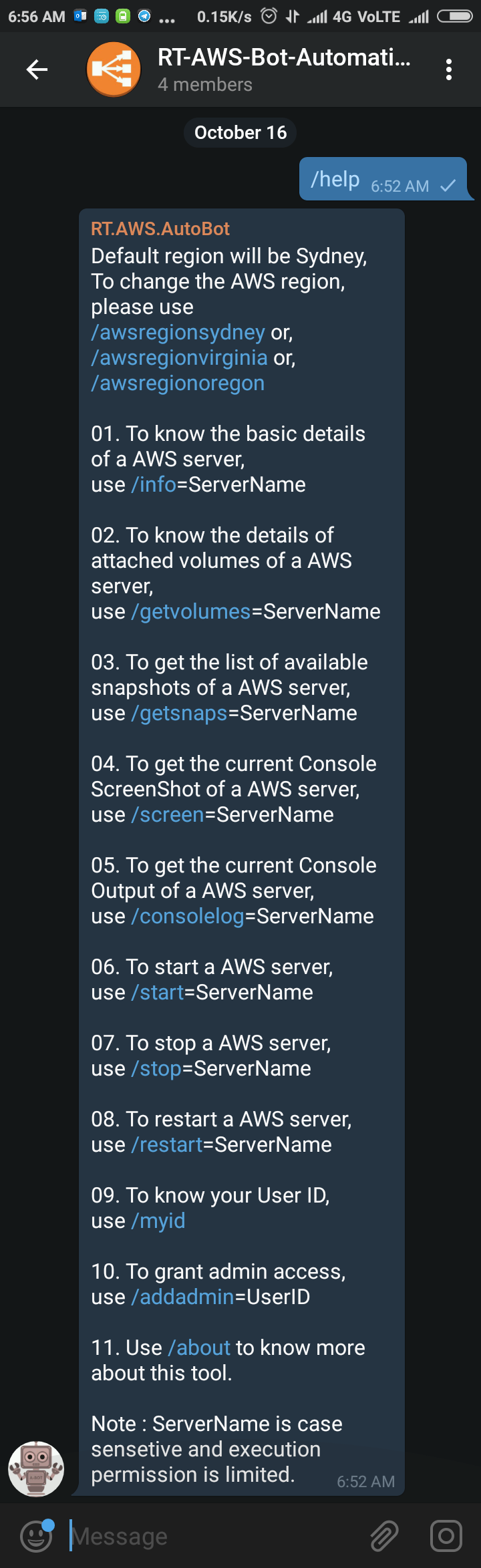
Sometimes back I was working on a free notification system using Telegram Bot (https://telegram.org/blog/bot-revolution), and I wrote a simple function in PowerShell, which could be use in various ways for sending instant notification to any smartphone for free (http://bit.ly/2ys1gF5). I thought what else we could do with it, and I have got an idea to use it as AWS Automation
Category: PowerShell
PowerShell Basics, PowerShell Scripts, PowerShell Modules, PowerShell Remoting, PowerShell Functions, PowerShell Active Directory, PowerShell Security, PowerShell Error Handling, PowerShell Variables, PowerShell Objects, PowerShell Package Management, PowerShell, PSCustomObject, cmdlet, PowerShell pipeline, PowerShell ISE, PowerShell 7, pwsh, Get-Command, Get-Help, Invoke-RestMethod, Import-Module

How to use AWS PowerShell cmdlets with Filter

I personally can’t imagine supporting a big infrastructure without introducing automation and to automate something you have to use command line. If you are more into Windows and started working on AWS for your clients, then I assume that you would love to start managing AWS using AWS PowerShell Module like I do. AWS Console is really good and informative
Cleanup disabled users from AD Group/s
Cleanup disabled accounts from groups is one of the most boring job, and also take lots of time. Manually it’s almost impossible to maintain. Recently I had a request to perform such task for many groups, so, I wrote a script to do it automatically on behalf of me. I am now sharing this script, hoping this might help you
Multi-Thread Super-Fast Software Inventory Scan using WSMan (PowerShell Remoting)
Recently I was asked to pull the software inventory report from multiple severs hosted in Azure, but unfortunately pulling data from WMI not allowed, only PS Remoting was enabled, so I made some changes on my previous script and used Invoke-command to pull the date for all the servers. It was easy and the most effective way to extract that report
Multi-Threading Super-Fast Disk Utilization Report using Background Jobs in PowerShell

Automate task using script is always helpful, it reduced human error and efforts, but sometimes it still takes a lots of time to execute same command on multiple remote servers one by one. For example, my disk utilization script, it works perfectly fine, but taking lots of time to generate report for thousands of servers. To get the result faster