I personally can’t imagine supporting a big infrastructure without introducing automation and to automate something you have to use command line. If you are more into Windows and started working on AWS for your clients, then I assume that you would love to start managing AWS using AWS PowerShell Module like I do. AWS Console is really good and informative
Category: Tutorials
This is the place for all the in-house tutorials and developments.
Migrated this blog to Amazon LightSail from GoDaddy

Finally, I managed to migrate my blog from GoDaddy to Amazon Lightsail, and everything looks good so far. Thanks to Amazon Lightsail for providing a static public IP (34.198.110.82). It’s really simple to migrate your blogs from any other hosting Amazon Lightsail, details information can be found here. They have very attractive pricing, which is one of the reason I
Cleanup disabled users from AD Group/s
Cleanup disabled accounts from groups is one of the most boring job, and also take lots of time. Manually it’s almost impossible to maintain. Recently I had a request to perform such task for many groups, so, I wrote a script to do it automatically on behalf of me. I am now sharing this script, hoping this might help you
Re-enabling Network Adapter in Azure VM (Resource Manager)
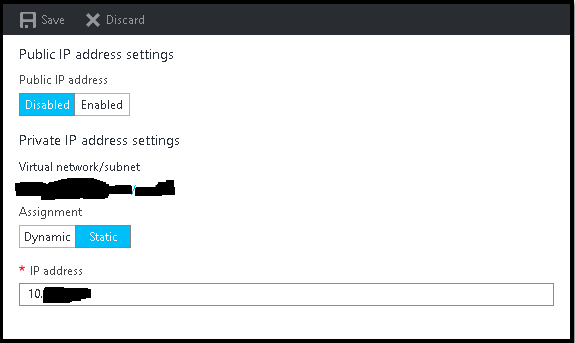
It is very common that sometimes we disabled the network adapter from VM to trouble shoot some network related issue, and after doing so we suddenly realize that we made a big mistake, especially if we do it on Azure VMs. Suddenly we lost all the communication to the VM, no RDP, no PowerShell, and VM got completely isolated from
Multi-Thread Super-Fast Software Inventory Scan using WSMan (PowerShell Remoting)
Recently I was asked to pull the software inventory report from multiple severs hosted in Azure, but unfortunately pulling data from WMI not allowed, only PS Remoting was enabled, so I made some changes on my previous script and used Invoke-command to pull the date for all the servers. It was easy and the most effective way to extract that report
New Feature : EC2 Instance Console Screenshot for Boot Troubleshooting
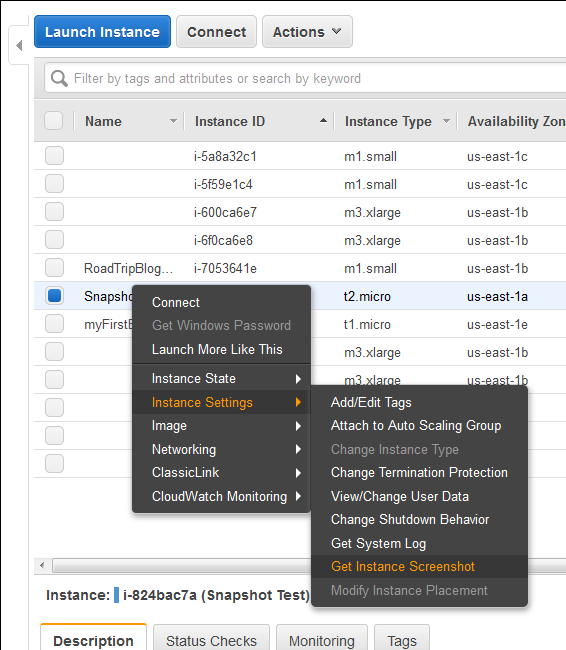
Finally a great feature add to AWS EC2 instances (HVM virtualization only), which was requested by almost everyone. Now we can take a console screenshot of any EC2 Instances. This is now available publicly. Earlier we had to log a case with AWS Support to get the AWS Console screenshot. This is a similar feature like Boot Diagnostics for Azure