Recently after installing FAX Server on our site, we are having some problem with opening received FAX file from user desktop. FAX files are .G3N/.G3F/.CTL of which .G3N and .G3F file can be opened in Windows Image Viewer and .CTL file can be opened in Notepad.
But the problem is, users have to make it their own, or we have to do it manually on all workstation across all branches. But it’s almost impossible to do so, so we have to think about some global solution.
Now we start working on creation a Group policy with which we can easily define default file association for those files and finally we created one.
FileAssociation.ADM
CLASS USER
CATEGORY !!category
	CATEGORY "Default Viewer/Icon for G3N File"
	KEYNAME "SoftwareClasses.g3nDefaultIcon"
	 POLICY !!policyg3nicon
	  EXPLAIN !!explain
	  PART Default
	  EDITTEXT
	  DEFAULT "shimgvw.dll,1"
	  VALUENAME ""
	  END PART
	 END POLICY
	END CATEGORY

	CATEGORY "Default Viewer/Icon for G3N File"
	KEYNAME "SoftwareClasses.g3nshellOpencommand"
	 POLICY !!policyg3nview
	  EXPLAIN !!explain
	  PART Default
	  EDITTEXT
	  DEFAULT "rundll32.exe C:WINDOWSsystem32shimgvw.dll,ImageView_Fullscreen %1"
	  VALUENAME ""
	  END PART
	 END POLICY
	END CATEGORY

	CATEGORY "Default Viewer/Icon for G3F File"
	KEYNAME "SoftwareClasses.g3fDefaultIcon"
	 POLICY !!policyg3ficon
	  EXPLAIN !!explain
	  PART Default
	  EDITTEXT
	  DEFAULT "shimgvw.dll,1"
	  VALUENAME ""
	  END PART
	 END POLICY
	END CATEGORY

	CATEGORY "Default Viewer/Icon for G3F File"
	KEYNAME "SoftwareClasses.g3fshellOpencommand"
	 POLICY !!policyg3fview
	  EXPLAIN !!explain
	  PART Default
	  EDITTEXT
	  DEFAULT "rundll32.exe C:WINDOWSsystem32shimgvw.dll,ImageView_Fullscreen %1"
	  VALUENAME ""
	  END PART
	 END POLICY
	END CATEGORY

	CATEGORY "Default Viewer/Icon for CTL File"
	KEYNAME "SoftwareClasses.ctlDefaultIcon"
	 POLICY !!policyctlicon
	  EXPLAIN !!explain
	  PART Default
	  EDITTEXT
	  DEFAULT "C:WINDOWSsystem32shell32.dll,-152"
	  VALUENAME ""
	  END PART
	 END POLICY
	END CATEGORY

	CATEGORY "Default Viewer/Icon for CTL File"
	KEYNAME "SoftwareClasses.ctlshellOpencommand"
	 POLICY !!policyctlview
	  EXPLAIN !!explain
	  PART Default
	  EDITTEXT
	  DEFAULT "C:WINDOWSsystem32NOTEPAD.EXE %1"
	  VALUENAME ""
	  END PART
	 END POLICY
	END CATEGORY

END CATEGORY

[strings]
category="Zita FAX File Associations"
policyg3nicon="Set Default Icon for G3N File"
policyg3nview="Set default Viewer for G3N File"
policyg3ficon="Set Default Icon for G3N File"
policyg3fview="Set default Viewer for G3N File"
policyctlicon="Set Default Icon for CTL File"
policyctlview="Set default Viewer for CTL File"
explain="This policy sets the default file association for G3N files and it's default icon. Custom Group Policy - TechnoChat.IN ! By Saugata Datta."
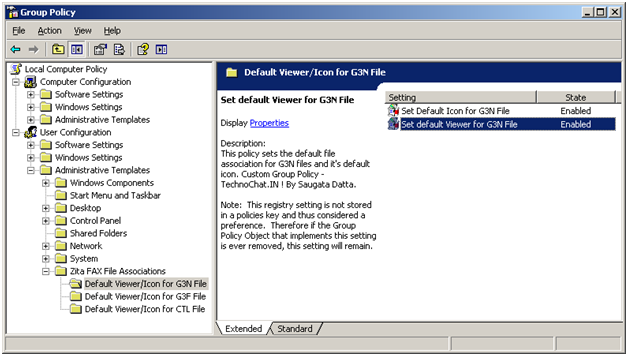
Group Policy Fig -1
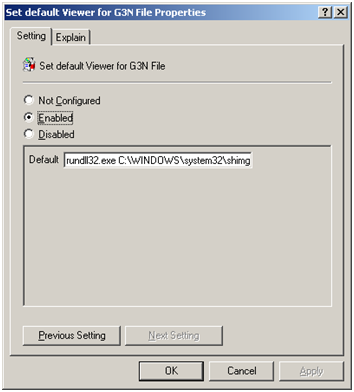
Group Policy Fig -2
EnjoY 🙂
 Licensed under CC BY-ND 4.0 International
Set File System Auditing via PowerShell
For last few days, I was trying to figure out how to…
Setup your own Monitoring – Disk Space Utilization Monitoring tool for free
It is always recommended to keep tracking of the disk space utilization…

Port Scanner using PowerShell with Email Notification
Few days back I was asked to create a script, which will…

AWS EBS Snapshots Automation (Disaster Recovery) from Windows PowerShell
It is always a good idea to reduce hardware dependencies by moving…
Hi There,
I am trying to make a group policy tempalte to change the default program for an already installed file extension. I was planning to modify this one, but when I import it (without altering) it creates the folder structure in GP but no keys? Any ideas?
You have to change the Filtering option, read following link for how to change..
https://technochat.in/2008/10/custom-group-policygpo-for-changing-desktop-background-colour
We like to use the ADM for a different application to file association, will you please tell what all changes has to be done with regards to using the ADM for another application.
You have to change the file ext part and file association. If you can tell me what do you want, then I might help you out 🙂