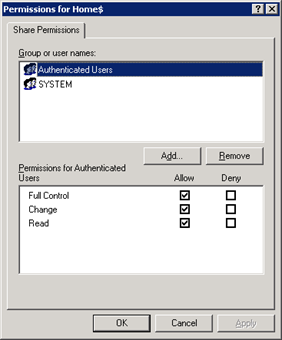
If you are having a domain controller, and decided to give a personal drive for all users, then home folder configuration is the best way to do it. But if you want to make it secure for every users, then you have to configure something extra with ntfs security and share security. Our current requirement as follows: Deploy home folder
Category: Self Hosted
Nextcloud, Home Assistant, Plex, Jellyfin, Vaultwarden, Pi-hole, AdGuard Home, n8n, Proxmox, Portainer, TrueNAS, Grafana, Uptime Kuma, Syncthing, Gitea, WordPress, Ghost, Immich, Paperless-ngx, Mealie, Audiobookshelf, Homepage, Dashy, Heimdall, Authentik, Authelia, Traefik, Nginx Proxy Manager, WireGuard, Tailscale, BookStack, Navidrome, Kavita, Tandoor Recipes, Memos, Appsmith, Appwrite, Gogs, Seafile, PhotoPrism, Sonarr, Radarr, Lidarr, Prowlarr, Bazarr, Overseerr, OPNsense, pfSense, Stirling-PDF, OctoPrint, File Browser, homelab, self-hosting, home server, homelabbing
Domain Tools v1.0 – For Delegating Users ID related Calls
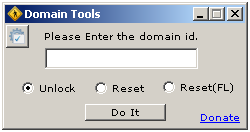
As being a Windows Administrator, I found that almost every day we spend ¼ of our working time for resetting password and unlocking user ids. I decided to delegate this job to someone else (Yes, I know that it can be done via OU Delegation, but in some complex environment, it’s not a good idea), hence I start coding a
AJAX Web Chat Server with Active Directory Authentication

Again, as per business requirement, we are looking for some free internal (LAN) chat solution. There are some free LAN chat tools available but most of them are failed to detect multiple VLAN, only working fine in single VLAN. But we need something which can be implemented on more than 50 branches across India. So we are looking for a
Set File Association via Group Policy
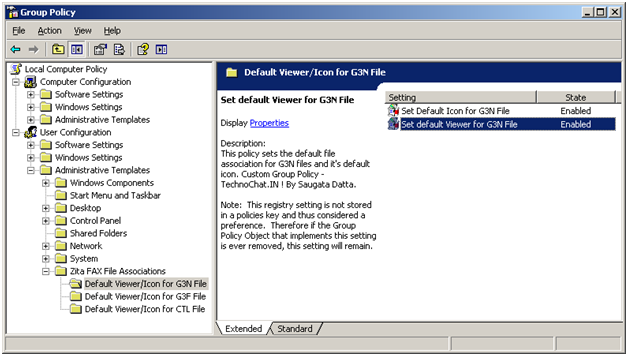
Recently after installing FAX Server on our site, we are having some problem with opening received FAX file from user desktop. FAX files are .G3N/.G3F/.CTL of which .G3N and .G3F file can be opened in Windows Image Viewer and .CTL file can be opened in Notepad. But the problem is, users have to make it their own, or we have
Disable Print Screen Function Via VBS Script (By using GPO Startup/Shutdown Script)
Another requirement, now customer need to disable default windows Print Screen function on all of their user desktop, So, we started our searching again, and easily we able to find out how to disable print screen on windows by importing following registry.
|
1 2 3 |
[HKEY_LOCAL_MACHINESYSTEMCurrentControlSetControlKeyboard Layout] "Scancode Map"=hex:00,00,00,00,00,00,00,00,03,00,00,00,00,00,37,e0,00,00,54,00, 00,00,00,00 |
So, again we start working to create a custom adm file. As because this is a HKLM
Hello world!

Welcome to Technochat.in, a place for all of us… Have fun.. 🙂