
Nowadays many things are getting blocked by the government, and sometimes without even a valid reason. When something like this happen to you, you probably looking for some way to bypass these restrictions, and most of the times we look for free or cheap VPNs. In today’s world, nothing is actually free, there is always something we are giving in
Category: Linux
Linux, Linux Basics, Linux Commands, Linux Servers, Linux Security, Linux Networking, Linux Distros, Ubuntu, Debian, CentOS, RHEL, Rocky Linux, Fedora, Arch Linux, Linux Performance, Linux Kernel, Linux Package Management, apt, yum, dnf, systemd, cron, chmod, chown, grep, awk, sed, Linux Troubleshooting, Linux firewall, iptables, nftables, tmux, screen
New Feature : EC2 Instance Console Screenshot for Boot Troubleshooting
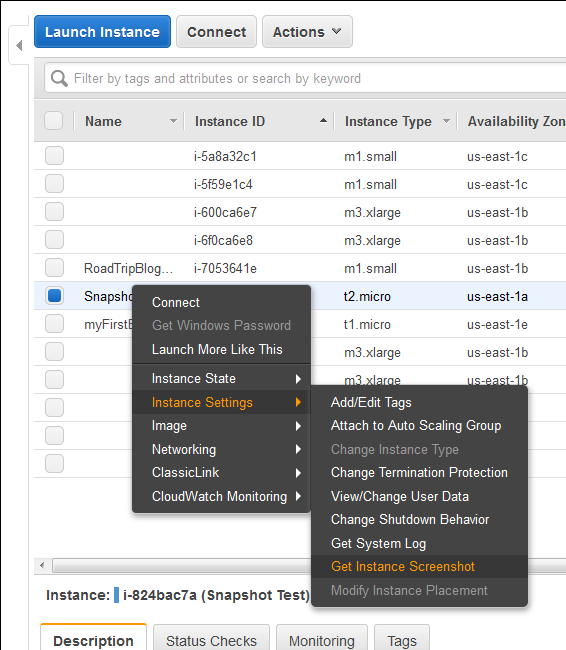
Finally a great feature add to AWS EC2 instances (HVM virtualization only), which was requested by almost everyone. Now we can take a console screenshot of any EC2 Instances. This is now available publicly. Earlier we had to log a case with AWS Support to get the AWS Console screenshot. This is a similar feature like Boot Diagnostics for Azure
Task Scheduler Error “A specified logon session does not exist” – Fix via Command Line and PowerShell for Scripting

This is very know issue, if you search internet, you will get multiple blog post with same solution for this issue, and if you follow the steps, it actually resolve this issue. In simple word, solution of this problem is Logon to the faulty system. Open SECPOL.MSC from Run Go to Security Settings | Local Policies | Security Options Open
Set File System Auditing via PowerShell
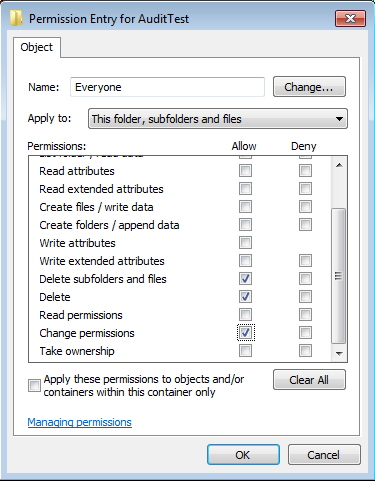
For last few days, I was trying to figure out how to set file system auditing via command line. I was looking for this as I had to apply some specific audit policy on multiple file servers. From GUI, we could do this, but it will take hours of manual activity. As requirement, I had to set Success Audit policy
Install UnRAR on Solaris 10 (Sparc)
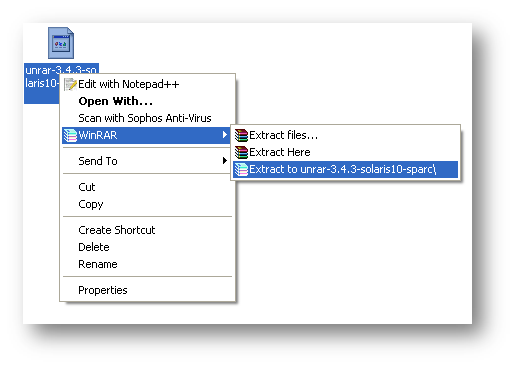
Download UnRAR from http://www.rarlab.com/rar_add.htm Extract .gz file on your system.
Logon as root/admin on Windows 7, Vista, XP, Gentoo, Debian, Ubuntu and Fedora without any Password
Now any user can logon to windows or linux system with Administrator or Root privilege, no matter what kind of permission he/she have by simply using a bootable floppy or bootable CD. And it is possible by using Kon-Boot. Kon-Boot is a prototype piece of software which allows to change contents of a linux kernel (and now Windows kernel also!!!)