Use following VBS script Startup or Shutdown script.
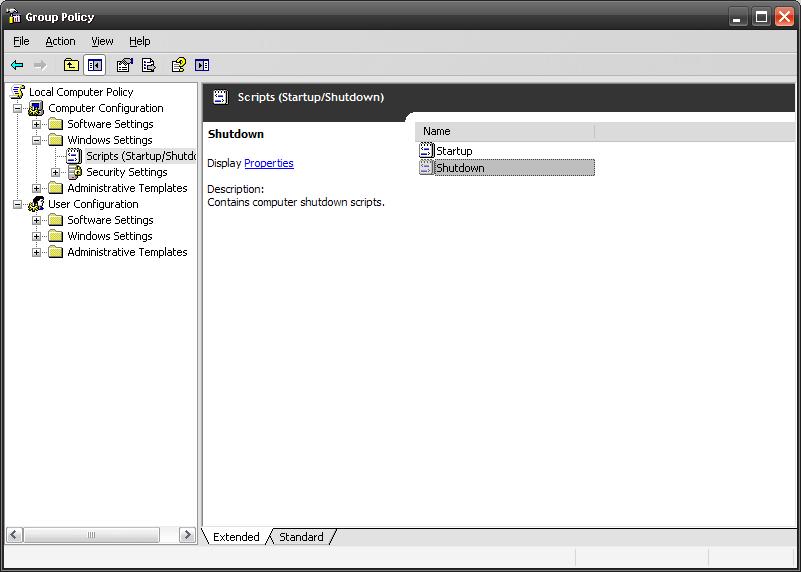
Option Explicit
Dim objItem, colItems, objWMIService, strComputer, objShell
strComputer = "."
Set objShell = CreateObject("WScript.Shell")
Set objWMIService = GetObject("winmgmts:\" & strComputer & "rootcimv2")
Set colItems = objWMIService.ExecQuery("Select * from Win32_OperatingSystem",,48)
For Each objItem in colItems
                If InStr(objItem.Caption,"2000") Then
                                'Add your line here for 2000
                                objShell.Run "regedit", 1, True
                End If
    		If InStr(LCase(objItem.Caption),Lcase("XP")) Then
                                'Add your command line here for 2000
                                objShell.Run "calc", 1, True
                End If
		If InStr(LCase(objItem.Caption),Lcase("2003")) Then
                                'Add your command line here for 2000
                                objShell.Run "notepad", 1, True
                End If
Next
with above script, on Windows 2000 it will execute regedit.exe, on Windows XP it will execute calc.exe, and on Windows 2003 it will execute notepad.exe.
You can change the file as you wish..
 Licensed under CC BY-ND 4.0 International
You Might Also Like

Microsoft Teams’ Efficiency Mode Arrives for Low‑End Devices
Microsoft is rolling out an Efficiency Mode for Microsoft Teams designed to…
How Attackers Abuse Microsoft Teams and Quick Assist: Inside the Helpdesk Impersonation Playbook
A new wave of attacks is quietly abusing everyday collaboration tools to…
New RDP Alert After April 2026 Security Update Warns of Unknown Connections
Microsoft’s April 2026 Patch Tuesday introduced a small-looking but important change to…

RedSun: New Microsoft Defender Zero-Day Lets Unprivileged Users Gain SYSTEM Access
A freshly disclosed zero-day vulnerability in Microsoft Defender, dubbed "RedSun," has raised…
Works for me…thanks… also,please provide with some more scripts 🙂
Great technology deals updated regularly