





There are certain steps to configure NTP on Solaris, and it’s really easy and simple. Just follow the following steps For Starting NTP on Solaris: Logon to the server using root. Now go to /etc/inet/ Rename ntp.client to ntp.conf Now edit ntp.conf and replace multicastclient 224.0.1.1 with server ip-of-your-winntp-server dos # ident “@(#)ntp.client 1.3 00/07/17 SMI” # # /etc/inet/ntp.client #
Latest Articles

Azure
Attackers Exploit SharePoint Authentication Bypass After Public PoC Release
Microsoft’s SharePoint platform is facing active exploitation following the public release of a proof-of-concept (PoC) for a critical authentication bypass vulnerability tracked as CVE-2026-55040. Patched in July’s Patch Tuesday, the flaw allows unauthenticated actors to impersonate SharePoint users by forging JSON Web Tokens (JWTs). Since the PoC surfaced, security researchers and telemetry providers have observed real-world attempts that underscore the urgency for administrators to apply updates and audit their environments. What happened Microsoft disclosed CVE-2026-55040 as a high-severity authentication feature…
Continue readingInstall UnRAR on Solaris 10 (Sparc)
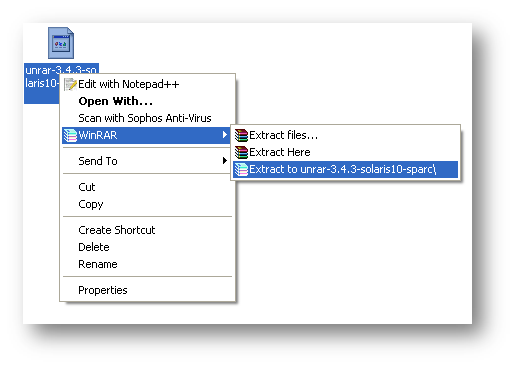
Download UnRAR from http://www.rarlab.com/rar_add.htm Extract .gz file on your system.
BAT/CMD Script Log Generator
BAT/CMD scripts are very much helpful to do a monotonous job automatically and sometimes the outputs of the batch script file are very much required. We can generate log file from batch file, but we can’t get the 100% log within batch file, so I was looking for a tool which generate log files from a batch script. After a
WinRAR v3.90 MSI Deployment

NOTE: We didn’t modify any internal files, just created an installation with demo version. We just changed few default registry settings as per our requirement. Again as per requirement, we have to deploy WinRAR on almost 1200+ system. So we decided to build a MSI for WinRAR deployment, will be painless and easy to deploy over all system with single
AJAX Web Chat Server with Active Directory Authentication

Again, as per business requirement, we are looking for some free internal (LAN) chat solution. There are some free LAN chat tools available but most of them are failed to detect multiple VLAN, only working fine in single VLAN. But we need something which can be implemented on more than 50 branches across India. So we are looking for a
RealVNC MSI Deployment

For giving instant remote support to almost 1500+ desktop, we have to use some remote control tool, so we decided to install RealVNC server only to all the system. But manually it will take huge time to install RealVNC server to all the system. So, I started working on convert it into MSI package, which we can easily deploy via