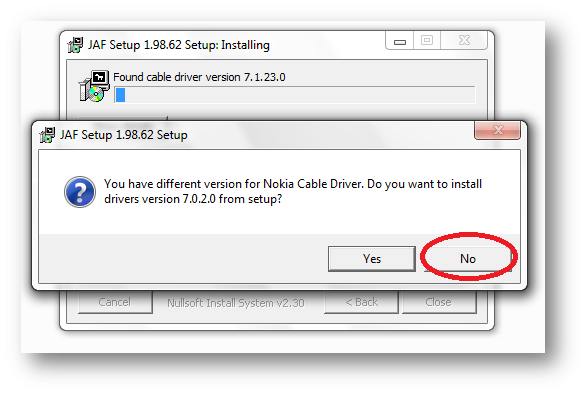
Following things you need… Nokia PC Suite 7.1. **Don’t use OVI Suite. http://nds1.nokia.com/files/support/global/phones/software/Nokia_PC_Suite_eng_web.exe JAF v1.98.6 PKEY Emulator v5 Following steps you have to follow… Install Nokia PC Suite 7.1 & Connect your Phone to finish installing all drivers and restart your system Install JAF v1.98.62 after restart (But don’t install Nokia Cable Driver comes with JAF Installer).
Category: Microsoft
Windows, Windows Server, Microsoft 365, Word, Excel, PowerPoint, Outlook, OneNote, Teams, SharePoint, OneDrive, Edge, Bing, SQL Server, Visual Studio, Active Directory, Dynamics 365, Power BI, Power Apps, Xbox, Game Pass, Surface, Intune, Defender, Exchange, Hyper-V, .NET, Dataverse, Microsoft Copilot, Copilot Studio, Microsoft Fabric, Power Platform, Windows 11, Windows 10, WSL, Windows Subsystem for Linux
Sync TIME in Solaris 10 Server with Local Windows(Active Directory) NTP Server

There are certain steps to configure NTP on Solaris, and it’s really easy and simple. Just follow the following steps For Starting NTP on Solaris: Logon to the server using root. Now go to /etc/inet/ Rename ntp.client to ntp.conf Now edit ntp.conf and replace multicastclient 224.0.1.1 with server ip-of-your-winntp-server
|
1 2 3 4 5 6 7 8 9 10 11 |
# ident "@(#)ntp.client 1.3 00/07/17 SMI" # # /etc/inet/ntp.client # # An example file that could be copied over to /etc/inet/ntp.conf; it # provides a configuration for a host that passively waits for a server # to provide NTP packets on the ntp multicast net. # server ip-of-your-winntp-server #multicastclient 224.0.1.1 |
BAT/CMD Script Log Generator
BAT/CMD scripts are very much helpful to do a monotonous job automatically and sometimes the outputs of the batch script file are very much required. We can generate log file from batch file, but we can’t get the 100% log within batch file, so I was looking for a tool which generate log files from a batch script. After a
WinRAR v3.90 MSI Deployment

NOTE: We didn’t modify any internal files, just created an installation with demo version. We just changed few default registry settings as per our requirement. Again as per requirement, we have to deploy WinRAR on almost 1200+ system. So we decided to build a MSI for WinRAR deployment, will be painless and easy to deploy over all system with single
AJAX Web Chat Server with Active Directory Authentication

Again, as per business requirement, we are looking for some free internal (LAN) chat solution. There are some free LAN chat tools available but most of them are failed to detect multiple VLAN, only working fine in single VLAN. But we need something which can be implemented on more than 50 branches across India. So we are looking for a
RealVNC MSI Deployment

For giving instant remote support to almost 1500+ desktop, we have to use some remote control tool, so we decided to install RealVNC server only to all the system. But manually it will take huge time to install RealVNC server to all the system. So, I started working on convert it into MSI package, which we can easily deploy via