Cleanup disabled accounts from groups is one of the most boring job, and also take lots of time. Manually it’s almost impossible to maintain. Recently I had a request to perform such task for many groups, so, I wrote a script to do it automatically on behalf of me. I am now sharing this script, hoping this might help you
Category: Microsoft
Windows, Windows Server, Microsoft 365, Word, Excel, PowerPoint, Outlook, OneNote, Teams, SharePoint, OneDrive, Edge, Bing, SQL Server, Visual Studio, Active Directory, Dynamics 365, Power BI, Power Apps, Xbox, Game Pass, Surface, Intune, Defender, Exchange, Hyper-V, .NET, Dataverse, Microsoft Copilot, Copilot Studio, Microsoft Fabric, Power Platform, Windows 11, Windows 10, WSL, Windows Subsystem for Linux
Re-enabling Network Adapter in Azure VM (Resource Manager)
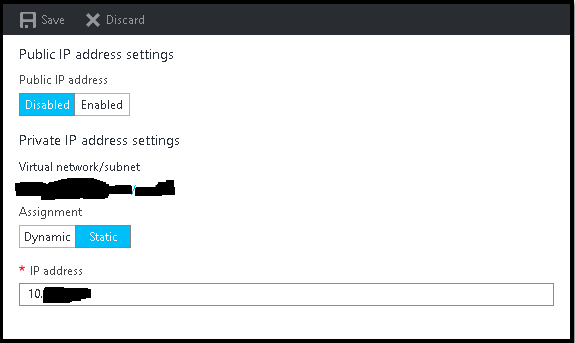
It is very common that sometimes we disabled the network adapter from VM to trouble shoot some network related issue, and after doing so we suddenly realize that we made a big mistake, especially if we do it on Azure VMs. Suddenly we lost all the communication to the VM, no RDP, no PowerShell, and VM got completely isolated from
Multi-Thread Super-Fast Software Inventory Scan using WSMan (PowerShell Remoting)
Recently I was asked to pull the software inventory report from multiple severs hosted in Azure, but unfortunately pulling data from WMI not allowed, only PS Remoting was enabled, so I made some changes on my previous script and used Invoke-command to pull the date for all the servers. It was easy and the most effective way to extract that report
How to boot Windows Server 2016 Technical Preview with GUI (Server with Desktop Experience) from VHD
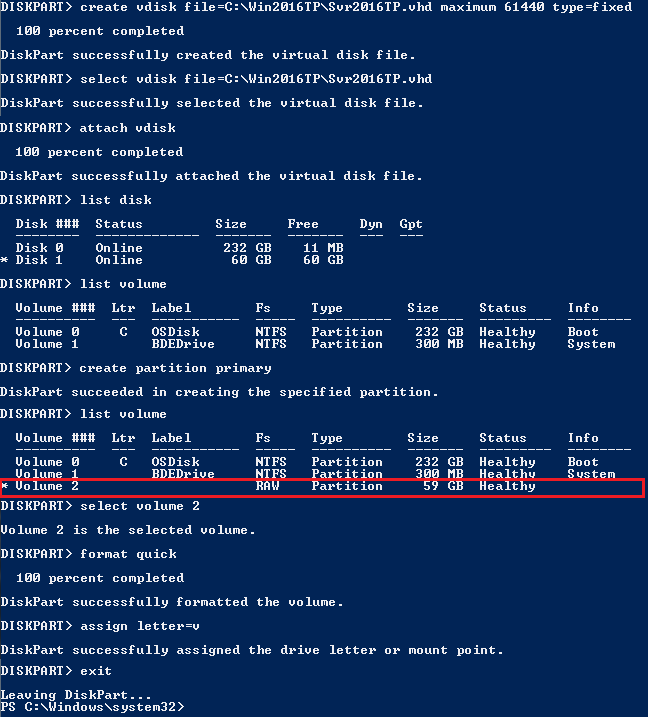
The reason behind writing this article is to use my Laptop (having Intel i3 4th Gen and 8 GB of RAM) as my LAB for testing new Windows Server 2016 TP4 and to do that I have to use boot from VHD option. There are multiple ways to boot your system from VHD but I don’t find a simple and
Setup your own Monitoring – Disk Space Utilization Monitoring tool for free
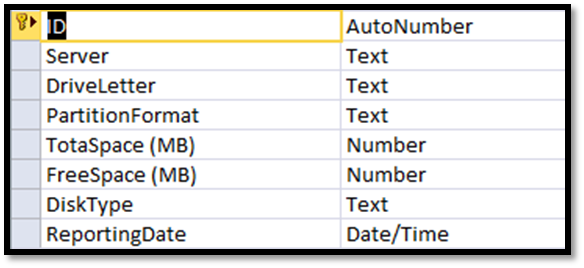
It is always recommended to keep tracking of the disk space utilization for you servers. This will help us to get the idea of our future requirement. There are multiple tools available for track this but you have to pay for most of them. Recently I also had similar kind of requirement and I was asked to provide the free
How to reset windows password (offline) on AWS Windows Instance

In simple word changing/resetting windows password is a very simple task using any third party free or paid tools as long as you able to access server console. Even on virtual platform like Hyper-V VMWare you have access to server console, but when it comes to AWS, there is no way to access console of a virtual instances. So, those